Showing posts with label 72. Show all posts
Showing posts with label 72. Show all posts
Wednesday, July 5, 2017
Backgammon v1 72 Apk Direct 7Mb
Backgammon v1 72 Apk Direct 7Mb



Description
The ancient, and evergreen, game of skill, strategy and luck.
? Google Play “Top Developer” AI Factory ?
Same as our "Backgammon Free", but no Ads.
Backgammon is a game of skill and strategy and one of the worlds classic parlour games, played for recreation and as a gambling game. Like Mahjong, this is a game that is played in social groups in coffee houses and bars. Historically variants of this game are believed to have originated in Egypt over 3000 years ago, but was picked up by the Romans and then later to India. It also spread to east Asia, but was then largely replaced by Xiangqi (Chinese chess). It is now very popular in the west.
Featuring:
-- User friendly interface
-- Strong Backgammon AI
-- 2 Boards and piece sets
-- Full match play + doubling cube
-- Hints, 2 player hotseat and stats
-- Designed for both Tablet and Phone
DOWNLOAD
Backgammon Apk
Get link for download

Saturday, June 24, 2017
Fly through walls Mini Militia Mod 2 2 72 apk Download UPDATED
Fly through walls Mini Militia Mod 2 2 72 apk Download UPDATED
Be like a ghost with this new Mini Militia fly through walls Mod apk. Fly through wall almost everything in the game just as you see in the image. You must have seen this wall Mod already while playing online. And Now you want this Mini Militia wall to hack for yourself.Doodle army Fly through walls Mod 2.2.72 apk Download[updated] link.
Fly through walls Mini Militia Mod 2.2.72 apk Download
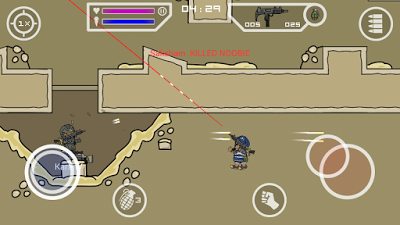
Experience intense multiplayer combat with up to 6 players online or 12 using local wi-fi. Train with the Sarge and sharpen your skills in offline Training, Co-op and Survival modes. Shoot a multitude of weapon types including the sniper, shotgun and flamethrower.
Features explosive online and local multiplayer warfare! Intuitive dual stick shooting controls. Open world maps utilizing rocket boots
 for extended vertical flight. Zoom control, melee attacks and dual wield ability with modern and futuristic heavy duty weapons and grenades. Play team based battles in this fun cartoon themed cross between Soldat and Halo.
Doodle Army 2 Mini Militia aka DA2, based on the original stickman shooter Doodle Army, was created based on player feedback and suggestions. We love to hear your ideas so thank
you and keep them coming! Give a call out to Sarge from the in-game email link!Purchase
the Pro Player Pack to get full access to dual wield ability, extra avatar customization items and online weapons such as the rocket launcher, sniper rifle, laser, saw gun and more! Mini Militia Fly through walls Mod 2.2.61 apk Download from below linkALSO SEE :- Mini Militia invisible Mod apk Download
ALSO SEE :- Mini Militia God Mega Mod Apk Unlimited Health
ALSO SEE :- Mini Militia God Mod Apk,Pro pack,Cheats,Avatars apk
Mini Militia Fly through walls Mod 2.2.72 apk Download
INFORMATION:Version 2.2.712 Pro Pack and All store
items unlockedUnlimited Nitro Jet pack Unlimited Ammo Unlimited Bombs No Reload No Root Needed- Version 2.2.72: This release gives you all the following functions with “custom” option in the game
- No Reload: Continues shots without reload.
- Pro Pack + All store items
- Unlimited Ammo: With every gun in the game you get to fire unlimited bullets without reloading.
- Unlimited Bombs: Unlimited grenades and deadly smoke bombs. Bombs can penetrate through the wall too.
- Fly Through Walls: Your avatar, bullets, grenades, guns can pass through walls.
- Gravity independent: Even without using jet pack you stay in the space like you do in “Lunarcy” map.
- Transparent Bush: Get to see who is hiding behind the bushes.
- Dual bullet shoots: Every trigger of the gun shoots 2 bullets simultaneously.
ALSO SEE :- Mini Militia God Mega Mod Apk Unlimited Health
ALSO SEE :- Mini Militia God Mod Apk,Pro pack,Cheats,Avatars apk
Fly Through Walls (You can hide inside wall and shoot):
GravityTransparent Bush (Can see who is hiding behind bush and tree
SCREENSHOT :-
Fly through walls Mini Militia Mod 2.2.72 apk Download

Fly through walls Mini Militia Mod 2.2.72 apk Download :-
Skip the ad and your Download starts
Enjoy !! Enjoy !! Enjoy !! Enjoy !!
Play With Your Friends & Online and Shock Them!!
1.Link 1 DOWNLOAD
2.Link 2 DOWNLOAD
Note: All Credits Goes To Sahadikr
SHARING IS CARING !!
ALSO SEE :- Mini Militia invisible Mod apk Download
ALSO SEE :- Mini Militia God Mega Mod Apk Unlimited Health
ALSO SEE :- Mini Militia God Mod Apk,Pro pack,Cheats,Avatars apk
HELP US TO HELP YOU BETTER | Keep Visiting !
Mini Militia Fly through walls Mod 2.2.72 apk Download and many other mods
Get link for download
Sunday, April 9, 2017
File Explorer Plus Root v5 0 0 72 Cracked APK is Here! Latest
File Explorer Plus Root v5 0 0 72 Cracked APK is Here! Latest

File Explorer Plus/Root
FX File Explorer version 3.0 is now available with a new Holo UI!
FX File Explorer is a file manager with optional media, networking, cloud, and root capabilities. FX is designed to let you quickly and easily manage all content on your phone or tablet.
FX has no ads.
The free main module of FX File Explorer (this product) includes all file management features for working with files on your phone/tablet.
The “FX Plus” add-on adds media management, network (FTP, SFTP, SMB, WebDAV) and cloud capabilities (Dropbox, Google Drive, SkyDrive, Box, SugarSync). The “Plus” add-on is a paid app (with a 7-day free trial).
The free “FX Root” add-on is for developers and knowledgeable enthusiasts who need to make changes as the root user.
General Features
- Productivity-oriented layout: The “Home Screen” shows bookmarks, storage, tools and (with FX+)
- media/network locations. You no longer have to wade through the garbage that apps store in the root folder of your SD card to get to the places you actually use.
- Dual pane mode and unlimited windows (quickly switch between different locations)
- Pinch-to-zoom in any “Explorer” window, zoom-in to see additional information about items
- Intuitive swipe-to-select gesture for managing multiple items (Slide finger horizontally across items to
- select/deselect them; see YouTube Videos, web site documentation, or in-app help for more information) “Usage View” mode analyzes storage space usage, enabling you to see total size of any folder
- Indexed Search
- File Viewers / Editors (included standard)
- Text Editor with Undo/Redo history, Cut/Copy/Paste, Find, and Pinch-to-zoom
- Binary (Hex) Viewer
- Image Viewer
- Media Player, pop-up Audio Player
- Zip, Tar, GZip, Bzip2, and 7zip Archive Extractor / Creator (.zip, .tgz, .tar.gz, .tar.bz2, .7z)
- RAR Extractor (UnRAR)
- Shell Script Executor
- Media Capabilities (FX Plus add-on required):
- Browse image and video collections
- Browse audio by artist, album, playlist, or all tracks
- Create and rearrange playlists with drag and drop (multiple files can be rearranged by selecting them)
- Network / Cloud Capabilities (requires FX Plus add-on):
- Windows networking (SMB)
- FTP (including secure FTP-S and FTP-ES)
- SSH FTP (Secure Shell FTP; password and public key auth)
- WebDAV (see help for using WebDAV with OwnCloud)
- Cloud Storage: Google Drive (incl. Google Docs), Dropbox, SugarSync, Box (Box.net), and SkyDrive (SkyDrive
- requires Android 2.2 or later)
- Stream video and audio media files from SMB, FTP, SSH, Google Drive, Dropbox, SugarSync, Box, and SkyDrive to media player applications
- Browse local network for Windows (SMB) shares
- Find FTP and SSH FTP local network shares using multicast DNS (mDNS) service discovery (Bonjour/Zeroconf/Avahi)
- Encrypted keyring (used to avoid entering sensitive passwords in public while not allowing access in event of device theft)
- Download and convert Google Drive / Google Docs files into Microsoft Word, Excel, PowerPoint,
- OpenDocument, PDF, and other formats
- Bluetooth Capabilities (FX Plus add-on required):
- Bluetooth FTP Client
- Discover / pair devices from within FX File Explorer
- Additional FX Plus Features:
- AES-256, AES-128 Zip Encryption. Browse inside encrypted Zip files, viewing text documents, images, audio, and video without writing unencrypted data to SD card
- App Management
- Browse apps by permission
NOTES:
- Streaming video playback: Format support is based upon third-party playback software installed on your
- device. Android typically supports MP4 and 3GP. FX can play AVI, FLV, MKV, and WMV formats *IF* you
- install third-party players available from the Google Play Store.
- GDrive / GDocs: Cut/pasted documents will be converted to Microsoft Office formats by default. Use “Open
- With” to download them in the format of your choice.
WHAT’S NEW
- FX 5 beta release. Major user interface updates. Added FX Connect to enable wireless transfers of files between
- devices, and FX Web Access (based on NextApp WebSharing) for computer-device file transfers.
- r5060: Major Material Design UI updates.
- r5067: Additional UI updates.
- r5070: Bugfixes, more convenient means of added OwnCloud servers.
- r5072: Bugfixes, New “Save As” feature.
How to install?
- Save the downloaded .apk on your android phone’s SD card
- Run and install it
- That’s it,Enjoy!

Screenshot

Downloads
File Explorer Plus/Root v5.0.0.72 APK (8.8 MB) /Mirror / Mirror
Get link for download
Friday, April 7, 2017
Download Dynasty Warrior Unleashed v 0 4 72 36 Apk Data For Android
Download Dynasty Warrior Unleashed v 0 4 72 36 Apk Data For Android

English version working on almost all GPU now *Xperia Play users only need to do&step B
APK v1.1.2 ( Korean Version )&|&alternative link
APK v1.1.3 (English version)&| alternative link
Data for English version&| alternative link
A. If you want to download the data via ingame, follow this steps especially for non-adreno user :
1. Download APK v1.1.3 from the link above, install and patch it with Lucky Patcher
2. If youre not using Adreno device, install Chainfire, set Pocket RPG with Qualcomm Plugin with Hide ID option checked.
3. Now you can download the game via ingame.
4. For non-adreno user, after downloading the data, open your Chainfire again, and set it back to default.
5. Go to point C.
B. If you want to use downloaded data from PC, follow these steps:
1. Download APK v1.1.3 from the link above, install and patch it with Lucky Patcher.
2. Copy downloaded data to sdcard/android/data
3. Download the Titanium Backup file, restore APK+Data.
4. Sometimes its required to patch Pocket RPG again with Lucky Patcher.
5. Go to point C.
C. Now, we need to set the keyboard, because the english version of this game is only working on Xperia Play, so we need a little trick to make it works on every device.
1. Download gamekeyboard&| alternative link. Install and follow step 1-3 to set your gamekeyboard.
2. Press step 4 to go to setting.
3. Follow these setting :
Select Gamepad -4 Buttons
Show Start & Select -Yes
Button Mappings
Button X - D-pad Center
Button Y - Gamepad X
Button A - Gamepad Y
Button B - Gamepad Z
Button Start - Gamepad Start
Button Select - Gamepad Select
[Vol.up/down] Key Action - Yes
4. Open the game, press volume up to call the gamekeyboard
Get link for download
Monday, March 27, 2017
App 2 SD Pro move apps to SD v2 72 Apk Direct 2Mb
App 2 SD Pro move apps to SD v2 72 Apk Direct 2Mb


Description
App 2 SD helps you to get more free internal phone storage space
Are you running out of application storage?
Do you hate having to check each and every app if it supports moving to the SD card?
Do you want an app that automatically does this for you and can notify you when an app can be moved?
App 2 SD streamlines the movement of applications to on your devices external or internal storage through your devices Settings. With this handy app, youll have more control over your ever expanding collection of apps. This app is crucial to anyone who has memory management issues.
? new App manager, batch uninstall, clear cache, view on Play and share apps
? View all SD card capable apps and move them seamlessly
? notify if movable apps installed
? 1-tap to clear all app cache
? export the app list to SD card
? install apps from the exported app list
? home screen widget shows cache and available size
? show app cache/data/code/total size
? keep track of total and available storage space
? sort through apps stored on phone and SD card
? add movable apps to the ignore list
? move apps back to the internal storage
? view app on Market
? quick uninstall apps by drag-n-drop
? open app
? show app details page
? support "Move2SD Enabler"
? customizable notification sound, vibrate and light
DOWNLOAD
App 2 SD Pro Apk
Get link for download
Subscribe to:
Posts (Atom)