Showing posts with label 86. Show all posts
Showing posts with label 86. Show all posts
Thursday, May 10, 2018
Future Ops Online Premium Apk v1 1 86 1 1 86 Free Download
Future Ops Online Premium Apk v1 1 86 1 1 86 Free Download

Minecraft Pocket Edition v0.10.5 Apk Mod [Immortality Mod]
Requirements: 3.0+.
Minecraft has to do with placing blocks to develop points and going on journeys.
Pocket Edition consists of randomly produced worlds, multiplayer over a neighborhood Wi-Fi network, and also Survival as well as Creative methods. You could craft and create with your friends anywhere in the globe so long as you have hands extra and also battery to burn.
Our latest upgrade included the well-known Creepers. Theyre big, environment-friendly, imply and explody. Yet its simply among several. Because Minecraft Pocket Edition Apk Mod first appeared, were continuouslying bring in loads of new functions, including
- Food Now you could cook and also go starving.
- Swords! Bows TNT
- Breasts.
- Skeletons.
- Spiders.
- Beds.
- Spray paintings.
- Lots more!
- But enough sales talk! Download it currently! And have a good time!
Just whats New In Minecraft Modded Apk
- 0.10 - Prettier, much faster, less buggier.
- Weve enhanced the graphics, enhanced performance, as well as exterminated heaps of insects in one massive update. Weve also stopped infant animals from sinking when they attempt to swimming because thats simply suggest. Update as well as have a good time!
- Loads of bug repairs.
- Even more watery-looking water.
- Foggier-looking fog.
- Even more particles than in the past.
- Tinted lights on surface and also mobs.
- Improved performance on numerous devices.
- More fences! Even more fence entrances! Everyone enjoys fences.
This application has NO advertisements.
Click For More Info
Download Minecraft Pocket Edition v0.10.5 Apk Mod
https://userscloud.com/8xbbmxic9vhc
Mirror:
https://www.tusfiles.net/kw28fjwp65a2
http://ul.to/go56j9y5
Get link for download

Wednesday, May 10, 2017
X plore File Manager Donate v3 86 11 Mod Apk is Here! LATEST
X plore File Manager Donate v3 86 11 Mod Apk is Here! LATEST

X-plore File Manager Donate
X-plore is dual-pane file manager with tree view, LAN/FTP/Root/Clouds and more.
Highlights
? Dual-pane tree view
? Root, FTP, SMB, Sqlite, Picasa, Zip, Rar, 7zip explorer
? Cloud storage access: Google Drive™, Dropbox, Box.net, Mega.co.nz ***, SkyDrive, Webdav, Yandex.disk, Ubuntu One, SugarSync, Dump Truck, Copy.com
? SSH File Transfer (SFTP) and SSH Shell – _http://bit.ly/xp-ssh ***
? Application manager
? WiFi file sharing *** – _http://bit.ly/xp-wifi
? Manage files from a PC web browser *** – _http://bit.ly/xp-web
? Favorite folders
? Built-in viewers for images, video, audio, text
? Hex viewer
? Fast Image viewer with zoom and slide to previous/next images
? Thumbnails for images and video as well as for various file types (depending on associated application)
? Multi-selection – always available, yet not disturbing
? View APK files as ZIP
? Share – send files by Bluetooth, email, or whatever the device supports, from anylocation
? Configurable buttons and key shortcuts
? Seamless work with Zip (as if it was normal folder)
*** marked features are paid – they require donation
X-plore allows you to see inside of your Android device. And also outside.
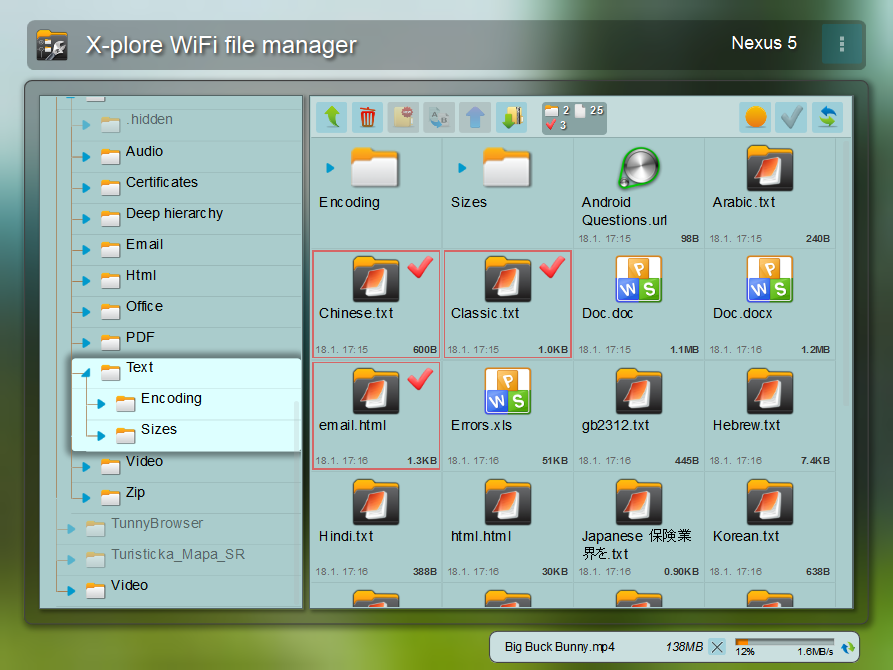
This is a dual-pane explorer, there are two folders shown at same time, and commonoperation such as copying files are done from one pane to another.
And X-plore shows folder hierarchy in a tree view for clear orientation and fast switching to other location.
And X-plore shows folder hierarchy in a tree view for clear orientation and fast switching to other location.
You may explore internals of the device, and if you’re power user and have your device rooted, you can make changes to system data – backup files, remove unwanted applications, etc.
If you’re standard user, you may choose to hide internal memory from view and be sure not to mess with system.
You can comfortably see contents of mass memories on your device, or possibly attached USB memory stick.
You can comfortably see contents of mass memories on your device, or possibly attached USB memory stick.
Simple app manager allows to see, run, copy, share, uninstall and further exploreinstalled applications.
WiFi file sharing
Access files on your Android device from other Android devices over WiFi.
Access files on your Android device from other Android devices over WiFi.
Access from a PC web browser
Manage files on your Android device from your PC.
Manage files on your Android device from your PC.
Access to FTP and FTPS (secure FTP) servers is supported.
Multiple servers may be configured.
Multiple servers may be configured.
X-plore can display shared folders on other computers in LAN (local area network).
The system allows access to shared folders on computers connected to LAN, or even remote server if it supports SMB protocol.
The system allows access to shared folders on computers connected to LAN, or even remote server if it supports SMB protocol.
X-plore can access various web storage “Cloud” servers, and access their files.
You need to have account in supported web service, then you can access your files stored online through X-plore.
You need to have account in supported web service, then you can access your files stored online through X-plore.
Supported is also SSH File Transfer (SFTP) and Terminal shell emulator.
Main operations are related to managing files and folders – viewing, copying, moving, deleting, compressing to Zip, extracting, renaming, sharing, and more.
Picasa albums
X-plore can list images in Picasa albums, download them, create albums, upload and delete photos, edit captions.
X-plore can list images in Picasa albums, download them, create albums, upload and delete photos, edit captions.
SQLite database viewer
X-plore can show SQLite database files (those with .db extension) as expandable list of tables, each table containing list of rows and columns with database entries.
X-plore can show SQLite database files (those with .db extension) as expandable list of tables, each table containing list of rows and columns with database entries.
Main interaction is done by touch screen, clicking on folders or files to open files, or long-click to open context menu which contains options which can be done on particular clicked item, or multiple selected items.
Multi-selection allows to do operation on more files at once. Files can be selected by clicking check box. It is also possible to select all files in a folder, or clear selection, by clicking parent folder’s check box.
Multi-selection allows to do operation on more files at once. Files can be selected by clicking check box. It is also possible to select all files in a folder, or clear selection, by clicking parent folder’s check box.
Opening file may mean to use one of built-in viewer for most popular file types: images, audio, video and text.
Or you may configure X-plore to use system application for opening files, in which case system-predefined application that can open particular file is launched.
Or you may configure X-plore to use system application for opening files, in which case system-predefined application that can open particular file is launched.
Archives (currently supported are Zip, Rar and 7zip) are displayed as other folders.
Additional interaction is possible by button bar, which is between two panes, and is fully configurable.
What’s New
3.81:
 TAR archives
Improvements for Android TV
3.81.02:
Fix for Google Drive “invalid token”
3.81.05:
Small fixes
TAR archives Improvements for Android TV3.81.02:
Fix for Google Drive “invalid token”3.81.05:
Small fixesHow to Install?
- Download Apk (link below).
- On your Android device, go to settings > security > allow unknown sources.
- Find downloaded APK on your phone and install it.
- All Done. Enjoy!
Screenshots
Download Links
X-plore File Manager Donate / Mirror
Get link for download
Subscribe to:
Posts (Atom)