Showing posts with label editor. Show all posts
Showing posts with label editor. Show all posts
Monday, June 25, 2018
Infix PDF Editor Pro 6 27 With Serial Key And Crack
Infix PDF Editor Pro 6 27 With Serial Key And Crack


Fast, flexible, flawless PDF editing
Infix PDF editor lets you open, edit and save PDF files. It’s easy and quick – you can change text, fonts, images and more. And, unlike other PDF editors, it works like normal word processing software, so it’s really easy to use.
Sort out typos: correct mistakes in PDF files quickly.
Reuse your PDFs: edit any PDF, without the source file
Use less paper: fill in forms without printing
It doesnt matter whether you change a single word, a paragraph, or an entire page. Infix is the only PDF editor that covers your back, reflowing and reformatting text to keep it looking good. Once you’ve saved a file, you can’t even tell it’s been edited.
Key features
Works like a word processor: no tricky tools to figure out
Edit practically anything: text, font sizes, images and more
Keeps text tidy: reflows paragraphs and columns automatically
Copy graphics and text between PDF files
Search and replace: in one file or across several at once
Create PDFs too – from any document: it’s as easy as printing or scanning
If we listed all the features here, you’d be looking at one of the longest web pages you’ve ever seen. Besides, the important things isn’t the length of the features list. It’s being able to do what you need.
Advanced features
Infix also includes some features you might need if you work with print-ready PDFs, convert printed documents, or need to translate documents into other languages:
OCR lets you create new PDFs from printed pages then easily make corrections where the OCR has mis-interpreted words.
Industry-standard CMYK colour picker ensures the colours you choose on the screen print accurately on paper too.
Translation tools allow you to export your PDF as XML, translate with your own translation tools then import and reflow the translated text back into the PDF.
Do more with PDF graphics
Infix Pro is a comprehensive PDF Editor. It includes tools for handling graphics such as grouping, hiding and locking. It also adds the ability to edit and create clipping masks plus a vertical ruler to allow easier object alignment together with grids, guides and page margins.
Impose / Place PDF
Re-use your PDFs as components in new documents by simply placing them on the page. Resize, rotate and move as you would any other object. Since Infix can also convert any kind of document into a PDF, you can effectively import any kind of document into a PDF.
Join PDFs using DragnDrop
Simply drag and drop any number of PDFs onto the Infix editor to merge them into a single document. You can also add headers, footers and page numbers across pages using the powerful Clone facility.
Translate PDFs using CAT tools and XML
Export a PDF as XML for translation using your favourite CAT tools. Then import the translated XML back into the PDF. Infix will fit the translated text back into the place where it originally came from, minimising the need to adjust page layouts and making any necessary font substitutions along the way.
Automatic text fitting
Whether for Infix Server templates or general artwork, advanced text fitting ensures your copy looks its best. Infix Pro PDF editing software offers complete control over auto-text-fitting enabling you to specify which metrics get altered during the fitting process. It can even perform text fitting across columns and pages.
Fill-in forms
Most PDF viewers offer form-filling. Infix goes further and helps you to fill-in traditional, non-interactive PDF forms as if they were interactive. Instead of printing off a copy to fill-in by hand, do it all within Infix.
Search & Replace across PDF documents
With its powerful batch mode Infix Pro can search across multiple PDFs or entire directories full of PDFs. It will work through all documents, leaving original documents in-tact and keeping track of any errors or problems during processing. You can also search and replace inside hyperlinks - handy if your companys web address has changed.
PDF Search and replace by font, colour or size
More advanced search criteria allow you to limit searches by the size, colour or font used for text. Useful for changing text in headers/footers without disturbing similar content in the main body of a PDF.
Redact text and images
Straight-forward and easy-to-use redaction allows you to quickly select and redact any piece of text or image. The redaction is utterly secure, removing the original text from the document and placing a coloured mark and/or label over the area.
Scan-to-PDF and OCR
Create new PDFs from your scanner using Infix. Convert scanned images into fully editable new documents, or searchable image-based PDFs. Easily make corrections to the text generated during the OCR process to ensure your PDFs are 100% accurate.
Works with Infix Server
Make PDF templates for Infix Server. Tag areas of text for replacement using the fielding facility. This also enables you to specify the kind of reflow that will occur during replacement. Tag images specifying the cropping and alignment to be used when replaced.
User defined stamps and watermarks
Create your own stamp annotations, hand-written signatures and watermarks and quickly apply them to your PDFs. Handy when you want people to know your identity - wether it be corporate or personal.
Get link for download

Tuesday, March 6, 2018
PicSay Pro – Photo Editor v 1 6 Apk Free Download
PicSay Pro – Photo Editor v 1 6 Apk Free Download

PicSay Pro – Photo Editor v 1.6
What s in this version
Please email us if you have issues.
1.6
- Increased maximum editing resolution for high-end
devices
- Fixes error when loading or saving small pictures .
- Adds Sport stickers
- Titles with custom fonts can now use all styles
- Improved quality of end result when using Resize to
make pictures smaller
Spice up the pictures on your phone with this award
winning photo editor
With Winter holiday stickers
Sharpen, remove red eye, crop straighten, distort,
insert cutouts of other pictures, paint, make color
splash out of black-and-white pictures, add text, word
balloons, apply effects like Cross Process, Lomo,
Vignette, faux HDR, Tilt-shift, Pencil Sketch, and much
more.
Includes support for Android tablets like the Motorola
Xoom, Samsung Galaxy Tab, Asus Eee Pad
Transformer, and others.
Supports pressure-sensitive drawing with a pen for
devices like the HTC Jetstream
Please Email if you have any issues
About PicSay Pro – Photo Editor v 1.6
Samsung Galaxy Free Downloads Savings Mirroring Mirror
UPDATED : January 27, 2013
CURRENT VERSION : 1.6
REQUIRES ANDROID : 1.5 and up
CATEGORY : Photography
INSTALLS : 500,000 – 1,000,000
Download Links:Zippyshare:PicSay Pro – Photo Editor v 1.6
Uploaded.net:PicSay Pro – Photo Editor v 1.6
Get link for download
Sunday, January 21, 2018
PhotoSuite 3 Photo Editor v3 2 309 APK
PhotoSuite 3 Photo Editor v3 2 309 APK

From the developer of the number one mobile office solution OfficeSuite!
PhotoSuite
PhotoSuite is a photo studio app with wide-ranging capabilities. From Photoshop essentials such as picture editing fun effects, combining of pictures, picture collages and sketching pictures to advanced photo art tools such as working with layers and masks as well as complex selection of objects – PhotoSuite allows you to create astonishing images. Share results with your friends and family in social networks, your cloud storage or via email.
Features:
Improve your photos - crop photos, apply fine tone and color changes to get the best of your photos.
Use advanced photo designer tools – work with layers to combine pictures and create work-of- art collages.
Enhance your images with graphical text and free drawing.
Work with picture filters and effects - Invert , Grayscale, Pointillize, Crystallize, Exposure, Posterize, Diffuse, Contrast, Displace, Kaleidoscope, Marble, Ripple, Block, Weave, Oil, Reduce noise, Sharpen, Edge.
File formats – PhotoSuite works in its own native format but can open and export images to the commonly used PNG, JPEG and gs formats.
Use comprehensive selection tools and grouping of objects to quickly and easily handle parts of your image.
Take advantage of your device camera to capture photos and include them in your image projects.
Share images – PhotoSuite allows you to share images with your family and friends – in social networks such as Facebook, Google +, Picassa or Twitter; in your cloud accounts like Dropbox (via their third party applications); as email attachments.
Whats in this version : (Updated : Jul 2, 2014)
Text tool with support of Android Serif, Sans-Serif and Monospace fonts and font size
Crop tool enhancements - ability to choose between standard aspect ratios such as 2, 1:1, 16:9 or to define custom crop aspect ratio.
Performance optimization - faster rendering on screen
Required Android O/S : 2.2+
Download : 4Mb APK

Get link for download
Friday, December 8, 2017
VivaVideo Free Video Editor Android With Apk File Free Download
VivaVideo Free Video Editor Android With Apk File Free Download

Download VivaVideo Free Video Editor APK file for Android mobile phones free. Download apk file from mediafire links. Android APK file are very easy to install.


Get link for download
Sunday, July 2, 2017
Prisma – Art Photo Editor 1 0 Build 10 Mod APK is Here ! LATEST
Prisma – Art Photo Editor 1 0 Build 10 Mod APK is Here ! LATEST

Prisma – Art Photo Editor
Prisma transforms your photos into artworks using the styles of famous artists: Van Gogh, Picasso, Levitan, as well as world famous ornaments and patterns. A unique combination of neural networks and artificial intelligence helps you turn memorable moments into timeless art.
Viral photo app sensation Prisma has just unveiled its beta app for Android users.
It has only been available on iOS for a little over five weeks, yet it’s already the number one app in 40+ countries, and has been downloaded over 7.5 million times, generating 1.5 million daily active users.
Features
- Prisma Video feature
- 360-degree Prisma images
- A long list of new ‘styles’ for you to transform your favorite photos into eye-popping bits of digital art.
Mod Info
- Support for Android 4.0
- No Watermark by default
How To Install ?
- Download and Install Prisma APK From The Links Given Below
- Done, Enjoy
Screenshots


Downloads
Prisma – Art Photo Editor APK Mod (7 MB) / Mirror
Get link for download
Friday, June 30, 2017
VIVA Video Free Video editor APk
VIVA Video Free Video editor APk
VIVAVideo: Free Video editor APk
Published Date: 13-03-2017
Size: 38.3 MB
Requirement: Android 4.0.3+
Description:
In Google play store Viva Video Editor is No one of the best video editor and Powered by top developer, viva video is on of the best video editor & slideshow maker apps in Android market. It has over 150 Million users all over the world and so for and has been featured in Google play many times, ranked as No. 1 free video editor &video in 70+ countries. With viva video, you can easily create your video story and share with your friends and family, transforming every day moments in to works of art as you want.
2016 brand new UL design brings you brand new experience.

Latest Version: 5.6.3
Google play install

Previous version
VIVA Video v 5.0.3 Apk
VIVA Video v 5.0.6 Apk
VIVA Video v 5.1.0 Apk
VIVA Video v 5.1.5 Apk
VIVA Video v 5.2.1 Apk
VIVA Video v 5.2.7 Apk
VIVA Video v 5.3.0 Apk
VIVA Video v 5.3.1 Apk
VIVA Video v 5.3.3 Apk
VIVA Video v 5.3.6 Apk
VIVA Video v 5.4.0 Apk
VIVA Video v 5.4.2 Apk
VIVA Video v 5.5.0 Apk
VIVA Video v 5.5.6 Apk
VIVA Video v 5.5.11 Apk
VIVA Video v 5.1.0 Apk
VIVA Video v 5.1.5 Apk
VIVA Video v 5.2.1 Apk
VIVA Video v 5.2.7 Apk
VIVA Video v 5.3.0 Apk
VIVA Video v 5.3.1 Apk
VIVA Video v 5.3.3 Apk
VIVA Video v 5.3.6 Apk
VIVA Video v 5.4.0 Apk
VIVA Video v 5.4.2 Apk
VIVA Video v 5.5.0 Apk
VIVA Video v 5.5.6 Apk
VIVA Video v 5.5.11 Apk
Get link for download
Tuesday, June 27, 2017
BeFunky Photo Editor Pro v5 3 3 APK
BeFunky Photo Editor Pro v5 3 3 APK

Edit photos, apply effects, add frames, save back to your phone!
Get link for download
Saturday, June 24, 2017
VivaVideo Pro Video Editor v3 8 0 APK
VivaVideo Pro Video Editor v3 8 0 APK

VivaVideo is your best video camera & video editor like never before!
Get link for download
Thursday, June 22, 2017
Color Effect Photo Editor Pro v1 4 6 APK
Color Effect Photo Editor Pro v1 4 6 APK

Color Booth allows you to take any image and manipulate the colors to allow you to easily visualize!
Get link for download
Wednesday, June 7, 2017
APK Editor Pro v1 5 9 Mod Paid Version Apk Is Here Latest
APK Editor Pro v1 5 9 Mod Paid Version Apk Is Here Latest

Description :
APK Editor is a powerful tool that can edit/hack apk files to do lots of things for fun.
It can help us to do things like string localization, background image replacement, layout re-architecting, and even ad eliminating, permission removing, etc. What it can do depends on how you use it. However, to use it well, we need a little bit professional skills. Don’t be afraid, some examples are given in the help page.
This is the pro version, compared to free version, here is some differences:
- No function limitation
- No ad
Instructions : [Untouched Apk]
- Download & Install Lucky Patcher
- Open LP and chose Rebuild and Install
- Find the downloaded untouched APK Editor Pro-1.4.3.apk
- Install it and Enjoy

Instructions : [Mod Apk]
- Download & Install Apk
- Enjoy
Screenshots


Downloads
APK Editor Pro Untouched Apk / Mirror / Mirror (6.0MB)
APK Editor Pro Mod Apk / Mirror / Mirror (6.0MB)
Get link for download
Tuesday, June 6, 2017
Pho to Lab PRO Photo Editor! v2 0 213 APK
Pho to Lab PRO Photo Editor! v2 0 213 APK

Photo Fun Generator - create awesome effects and caricatures from your photos !
Get link for download
Friday, May 26, 2017
Settings Editor Pro v2 1 Apk Is Here ! Latest
Settings Editor Pro v2 1 Apk Is Here ! Latest

Description:
This app allows you to easily add, change or remove items in (close to) stock Android Settings.
Features:
- You Can Add:
- Name
- Specify the name for the item
- Icon
- Choose an icon from installed applications or make your own and choose it from your pictures
- Category
- Specify an existing category to add it to that category or make your own category
- Package
- Choose the app to launch in a list of installed applications or specify the package name yourself
- Settings fragment
- Allows you to specify a custom Settings screen (advanced user feature)
2. You Can Edit :
- Same options as add, just enter the name of the item you want to change, and you can change its icon, or launch app/settings fragment
3. You Can Remove:
- Just enter the name of the item you want to remove
- You can easily modify a setting by just clicking it or remove the modification by long clicking it.
What’s New ?
- Updated translations
- Added option to change amount of columns in settings
- Added option to show icons only and change their size
Instructions:
- Just download and install it
- Enjoy !
No Ads
Screenshots:

Downloads:
Settings Editor Pro .apk (2.5 MB) | Mirror
Get link for download
Wednesday, May 17, 2017
Magisto Video Editor Maker v4 12 15604
Magisto Video Editor Maker v4 12 15604

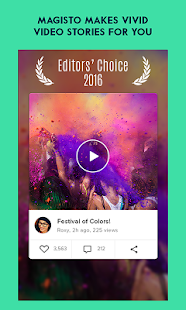
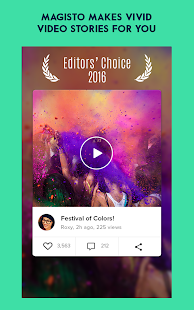
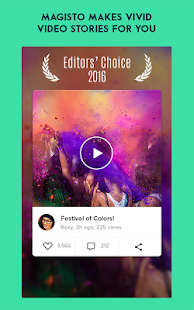
gisto Video Editor automatically turns your photos and video clips into magical music videos that you’ll want to share with friends and family on Facebook, Instagram and more. Magisto Video Maker has over 70 million happy users worldwide and was featured in Google Play Editors’ Choice, Google’s list of Best Android Apps of 2015 and CES best app of the year!
Express your creativity – make a movie and tell your story by working with Magisto’s free movie editor. You don’t need to be an expert photo or video editor, Magisto’s magic will create a professional looking music video from as little as a few photos or a video clip. It’s that easy!
Express your creativity – make a movie and tell your story by working with Magisto’s free movie editor. You don’t need to be an expert photo or video editor, Magisto’s magic will create a professional looking music video from as little as a few photos or a video clip. It’s that easy!
Magisto Movie maker has been featured on CNN, NBC Sports, Rolling Stone Magazine, New York Times, Wall Street Journal, USA Today, TechCrunch, Mashable, Wired, VentureBeat, CNET and Forbes.
? SHARE VIDEOS
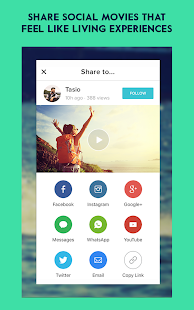
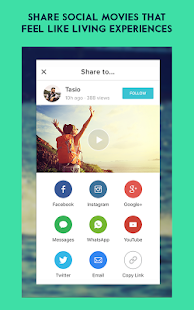
Share your videos on Facebook, Instagram, Google+, Twitter, Email, YouTube and Whatsapp. Create special Instagram videos and share them right to your Instagram account. Add your Instagram videos and photos, selfie videos, mp4 movies and more.
? AUTO VIDEO MAKER
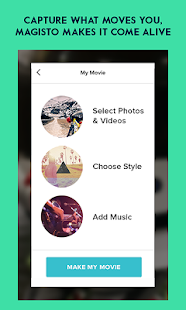
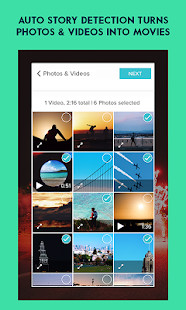
Imagine a personal video maker available 24/7 that transforms your photos and videos into a music video masterpiece. Magisto movie maker creates sensational photo video clips using your photos.
? MUSIC VIDEOS
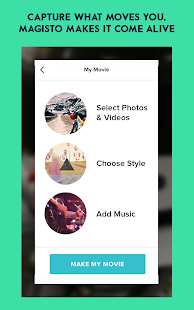
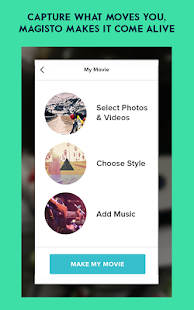
Upload photos and videos from your gallery or use Magisto as a smart video camera. Add music to video from your device or from Magisto’s music library and make an amazing music video.
? VIDEO EFFECTS
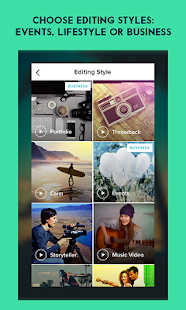
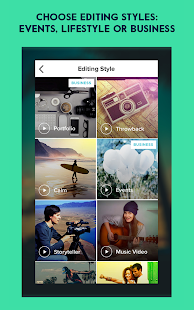
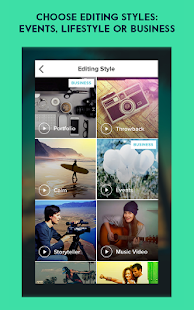
Choose your movie editor style and let Magisto apply automatic video stabilization, facial recognition, video filters, video effects, and smooth transitions to turn your photos and videos into beautiful memories. From time to time Magisto movie maker will SURPRISE you with beautiful video clips created from your photos and videos.
? CHANNELS & COLLECTIONS
A video story discovery experience curated with amazing video clips around your passion. Sport video, foodie videos, wedding movies, baby movies, selfie video, Instagram video, you name it.
? VIDEO COLLAGE
Use the wide variety of editing styles to make amazing Graduation Videos, Sports videos, Selfie Video, Instagram Video, Slideshow Videos, Birthday Movies, Baby Movies and Wedding videos. Are you a Foodie? Choose our ‘Foodie video’ editing style to turn your foodie photos and videos into food adventure movies.
? REVOLUTIONARY TECHNOLOGY
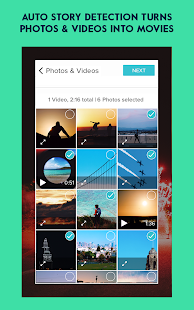
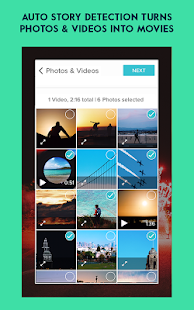
Magisto video editor analyzes and combines your best photos and video clips into fun movies. Facial recognition detects the most important people in your photos and videos to create personalized movies you’ll love to share!
? FAMILY VIDEO
Capture the moment; transform your wedding photos and wedding videos into elegant wedding movies. Easily turn your baby’s first moments into adorable baby movies. Share a birthday video greeting card or recap your favorite birthday movie memories with our colorful birthday video editing styles.
Screenshots

Downloads
Magisto Video Editor & Maker v4.12.15604 / Mirror
Get link for download
Friday, May 12, 2017
APK Editor APK Free download for your Android
APK Editor APK Free download for your Android
APK Editor APK Free download for your Android
Size: 9.6 MB
Publish date: 19-02-2017
Require: Android 3.1+
Your are downloading APK Editor APK for your android to get a powerful tool that can edit/hack the files to do lots of changes with fun. It can help you to do things like string localisation, background image replacement, layout, re-architecture and even ad eliminating removing etc. What it can do depend on how you use it. Hove every it use it well, it need only little skills.
Through this app you can choose two type of editing. Full Editing which lets you rebuild files from an APK. and the second is Simple Edit, which lets you replace the files inside an apK. First one is more complex than the second one.
Through this app you can choose two type of editing. Full Editing which lets you rebuild files from an APK. and the second is Simple Edit, which lets you replace the files inside an apK. First one is more complex than the second one.

- It support smile editing.
- It support app data editing.
- AD Free.
Latest version: 1.8.1
Download
Google play Install
Download
Google play Install
Previous versions:
APK Editor APK Free download for your Android v- 1.6.5
APK Editor APK Free download for your Android v- 1.7.4
APK Editor APK Free download for your Android v- 1.7.6
APK Editor APK Free download for your Android v- 1.7.8
APK Editor APK Free download for your Android v- 1.8.0
Get link for download
Thursday, May 4, 2017
Prisma – Art Photo Editor 1 0 Build 7 Mod APK is Here ! LATEST
Prisma – Art Photo Editor 1 0 Build 7 Mod APK is Here ! LATEST
Prisma – Art Photo Editor
Prisma transforms your photos into artworks using the styles of famous artists: Van Gogh, Picasso, Levitan, as well as world famous ornaments and patterns. A unique combination of neural networks and artificial intelligence helps you turn memorable moments into timeless art.
Viral photo app sensation Prisma has just unveiled its beta app for Android users.
It has only been available on iOS for a little over five weeks, yet it’s already the number one app in 40+ countries, and has been downloaded over 7.5 million times, generating 1.5 million daily active users.
Features
- Prisma Video feature
- 360-degree Prisma images
- A long list of new ‘styles’ for you to transform your favorite photos into eye-popping bits of digital art.
Mod Info
- Support for Android 4.0
- No Watermark by default
How To Install ?
- Download and Install Prisma APK From The Links Given Below
- Done, Enjoy
Screenshots
Downloads
Prisma – Art Photo Editor APK (7 MB) / Mirror( For 4.0+)Prisma – Art Photo Editor APK (7 MB) / Mirror
Get link for download
Friday, April 28, 2017
HDR FX Photo Editor Pro v1 6 1 APK
HDR FX Photo Editor Pro v1 6 1 APK

HDR FX Photo Editor gives you the best and most vibrant HDR like look on any mobile platform and this is all accomplished from just a single image!
Get link for download
Friday, March 31, 2017
BeFunky Photo Editor Pro v5 3 2 APK
BeFunky Photo Editor Pro v5 3 2 APK
Edit photos, apply effects, add frames, save back to your phone!
Get link for download
Friday, March 17, 2017
VivaVideo Pro Video Editor v3 4 0 APK
VivaVideo Pro Video Editor v3 4 0 APK

VivaVideo is your best video camera & video editor like never before!
*********************************************
Download: Apk ------> ???? ??? ??????? / Click here
*********************************************

Get link for download
Subscribe to:
Posts (Atom)