Showing posts with label iphone. Show all posts
Showing posts with label iphone. Show all posts
Friday, February 9, 2018
Download BBM Mod Tema Iphone Ungu Elegant Update Musik Versi 2 5 0 32
Download BBM Mod Tema Iphone Ungu Elegant Update Musik Versi 2 5 0 32
Hi Guys Presenting Floating SystemUI + Sliders for All Custom Roms of Galaxy Y.Not for Stock Rom.Shared by Xda Member markmellarpes.
Screenshots:


o Download the xxx.zip & CWM.zip place in root directory of Sdcard
o Reboot in Recovery mode by pressing vol up+home+Power button together once you enter recovery mode touch screen become function-less so use volume up and down to move up and down, home button for selection and power as back button.
o Now in recovery mode select "apply update from sdcard" and navigate to the root directory of sd card and select cwm file "cwm-madteam-galaxY.zip" this will take you to clockworkMod Recovery.
o Mount All
o Now select "install zip from sd" and then choose xxx.zip and select yes.
o Reboot
Download Links:
Floating-UI.zip Link
Floating-UI+carrier.zip Link
Cwm.zip Link
Get link for download

Monday, December 25, 2017
iPhone Messages 1 0 4 apk
iPhone Messages 1 0 4 apk


iPhone Messages is an iphone style Messages app. Cool UI like ios. It is very simple to use, just like iphone.
FEATURE:
- iphone style ui.
- manage messages conveniently.
- backup messages.
update 1.02
- modify the setting error.
update 1.03
- modify receive sms message twice bug.
- get rid of the notifycation of sms, else it will be notify reduplicate with system sms app.
Download Here: http://adf,ly/9fTXR
Mirror(Mediafire): http://adf,ly/9h9HvGet link for download
Thursday, September 14, 2017
Review Now Cheapest Apple iPhone 5c at 36000
Review Now Cheapest Apple iPhone 5c at 36000

Apple has come up with good news for all his fans by reducing the price of iPhone 5C which was launched at price of 41900* but now you can buy at 36899 on line from amazon,in. At present amazon as listed blue and yellow color 16Gb iPhone in that models.. and other colored models like green,white and pink are around 39500 a bit higher than the others. iPhone 5c is plastic design of the iPhone 5 , it has 4" retina display and dual core.Its compact with 8mp rear facing camera along with a face time HD camera. It also supports multi touch display and best in battery backup. 250hrs on stand by and talktime 10hrs on 3G.
For more detailed specification you can check out here.
Get link for download
Tuesday, May 16, 2017
Go Locker iPhone Lockscreen v1 3 Apk Direct 230Kb
Go Locker iPhone Lockscreen v1 3 Apk Direct 230Kb
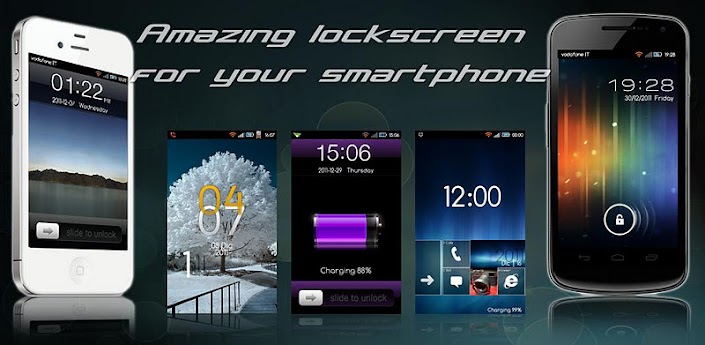
Description
iPhone GO LAUNCHER EX LOCKER developed by Alle46
*DO NOT open from market! Apply by Go Locker *
====>Tips:
1. Make sure GO Launcher EX V2.67 or above and GO Locker v1.05 have been installed;
2. Click “MENU—->Preferences—->Theme Settings—->GO Locker---->My locker” to choose the theme;
DOWNLOAD
Go Locker iPhone Lockscreen Pro Apk
Get link for download
Saturday, April 15, 2017
iPhone 6S 3D touch display used as a scale
iPhone 6S 3D touch display used as a scale
WhatsApp is one of the most popular and commonly use messaging app among smartphones users. There are lots of different messenger are available in market but the craze for WhatsApp is never become down. It’s users also demanding new features in this app because it doesn’t support some feature like free calling etc. If you want more feature you can download WhatsApp Plus APK for Android.
WhatsApp Plus will gives you more exiting features for which you are looking. Messaging apps have become a necessary part of our life, use of these apps is become more and more addictive for us.

When you think about a cool messaging app, WhatsApp will be in your top priority. The question is why you should use unofficial version of this app rather then it’s it’s official version, reason is if you want something more from the app to meet out your expectation.
Features of WhatsApp Plus for Android
Friends before providing you features first we want to tell you something that, we never recommend you to use any unofficial version of games or apps because it is directly related to you privacy. But this app is looking good and we’ve not find any problem, but you should use it app at your own risk.
So friends now we can move to the process of providing feature of WhatsApp Plus for Android, then you will move to our next step of giving you to get download WhatsApp Plus APK for free.
This is the unofficial version with more feature or you can say that it’s a modded app version.
Dear friends the unique feature of WhatsApp Plus which makes it must download app is it’s customization option which are more popular among users of this app. It has many new exiting features with all functions of official application.
Plus theme option enables you to change icons and images as per your choice, this is the main feature which is people most like. You have color mod choice for your status, transparency control in chat screen.
This WhatsApp Plus take care of your messages even offline also to mention you updated forever, it lets the user to have more control theming, so you can enjoy colorful chatting with your friends and family members. WhatsApp Plus has also similar function that you can do free chat with you friends.

You can send and receive free messages by this app and that are free that meant there are no limit for sending & receiving messages. It also allows you to share photos, videos , voice note to other users that’s to available for free. WhatsApp Plus is free for one year and then you have to pay some amount of money for using, If you install new version of WhatsApp Plus the it won’t ask you to buy new one.
WhatsApp Plus APK for Android Free Download
Also Read – How To Disable Last Seen Timestamp Feature of WhatsApp
So guys be ready to enjoy these new function with all common functions of the official app. I think you’re surely going to download this after reading above specifications. Below it the link to get it.
You have to click here to download this application
After clicking on above link you’ll able to download WhatsApp Plus APK for Android. It’ll redirect you to different webpage.
When you download this file from the above mention link i.e. WhatsApp Plus APK in you smartphone or any other Android device like tablet click on it it open and install.
We hope you like this article, stay tuned for more updates coming on our website. Thanks for reading this posts.
Get link for download
Tuesday, April 11, 2017
How To Enable iOS 9 1 Emoji On Jailbroken 9 9 0 2 iPhone
How To Enable iOS 9 1 Emoji On Jailbroken 9 9 0 2 iPhone
Internet is growing with every second and is all about openness. Any type of restriction over the internet is not less then a cage and just kills all of it’s taste. Websites like Youtube are banned in some countries, and if seen from a positive point of view, such websites contain great content and are helpful for so many things whether it’s education, it’s cooking, it’s singing, it can be anything. To discover content on these sites and get rid of the restriction put by your ISP, you need to get connected over the internet anonymously and that’s possible by changing the IP address manually or using a proxy application.
Using proxies is the most common and the only method that people know about to access blocked / banned websites. But some computer freaks might be aware of the very simple and easiest method, changing the IP address (as mentioned) of a computer and accessing the blocked websites anywhere in the world. Changing IP address is quite simple, you just need to find a working IP address and then put it along with it’s port in the internet options > connections > lan settings > proxy settings and it will do the job here, but how about changing the IP address in an Android device and access the internet at fast speed just like you access on a desktop PC or laptop by changing IP address? Well, changing the IP address has multiple advantages. You can save the battery life of your device that a proxy application will most probably eat, you can access the internet at the real speed of your connection, you can access the websites without any extra ads that proxy applications most probably put and a lot more.
In the following post we will go through a method that explains how you can find a working IP address and also how you can change the IP address on your Android device and access the blocked websites easily. Let’s move forward.
How to change the IP Address on your Android device:
- First of all you need to find a working IP address along with it’s port. There are numerous sites that provide IP addresses, a little googling may be of much help here. An IP address is a number having a colon and then followed by a post. For example 172.27.2.100:8080 , here the part before colon is IP address and after is Port. You got to put both in their relevant boxes.
- You can determine the working state of the IP address by seeing it’s speed on the provider’s site.
- Once you’ve got an IP address, copy it.
- Now on your Android device, tap settings.
- In settings tap connections > network connections > WiFi.
- Now in WiFi you will find the list of WiFi networks available around, tap the one you’re connected with for a few seconds.
- After keeping it tapped, you will see two options Forget Network & Modify Network.
- Tap Modify Network Config > Show Advanced Options.
- In Advanced Options select Proxy > Manual.
- Once you tap Manual, you will find Proxy & Port boxes below.
- Paste the IP address in Proxy & Port in the Proxy Port box.
- Save now.
- In older devices, you need to tap Settings > Network Connections > WiFi Settings > Advanced > Proxy and put the IP address & Port here.
- To stop using the Proxy IP Address, simply remove the IP Address from the same location and disable “Advanced Options”.
- That’s All!


We will soon post a video tutorial as it may confuse a lot of users. We hope that the tutorial helps you guys for now, in case you got any queries, please don’t hesitate to stop by the comment box below. Thanks all.
Get link for download
Tuesday, April 4, 2017
Iphone 5s Rom for Samsung Galaxy Fit
Iphone 5s Rom for Samsung Galaxy Fit
FEATURES
- New Iphone 5s Launcher
- Iphone pure View
- IPhone Status Bar
- Iphone Dialer
- Iphone Ringtones
- Siri App Added
- Iphone Music App
- Beats Audio Added
- Very Stable And fast
- Dual Call Application
- Iphone Massenger Added
- And Many More Features
SCREEN SHOTS
Coming Soon
NO BUGS
Download LINK
Rom: Iphone 5s
Get link for download
Friday, March 31, 2017
IPhone 5S solution to the problem is not charging Draning problem Battery
IPhone 5S solution to the problem is not charging Draning problem Battery
IPhone 5S solution to the problem is not charging Draning problem.Battery

Model: A1533 iPhone 5S
However, the battery is going to meet up after charging a fully charged battery, new battery does not charge for mole phone.
Methods: trying to clean up the charge, but no luck Logicbord new iOS, new battery, Flex load change.
Succesfull way: just compensation (U2) IC to change the phone is working perfect
See this image
DOWNLOAD ANDROID
A clear signal to the first step in trying corrosion corrosion to face, when exposed to water or water in good condition, charger connector checks the physical condition. Clearly, the problem is not resolved. The second step is to try. DOWNLOAD ANDROID
Jumpers in the picture above as a charger Lines, is divided over the second step, to check it out in the picture. This carefully to avoid short. good luck
For us to improve your mobile phone on this blog presented a solution to repair the damage caused by an error, MobileSmd.com respondent does not want to help a little
DOWNLOAD ANDROID
Get link for download
Subscribe to:
Posts (Atom)