Showing posts with label network. Show all posts

Tuesday, March 27, 2018

Aircel 3G Trick With Reliance 3G Roaming Network All Over INDIA

Aircel 3G Trick With Reliance 3G Roaming Network All Over INDIA


Buy Aircel 3G Sim From Aircel 3G States
And Use It Non Aircel 3G State 
With Reliance 3G Roaming Network
No Speed Capping
With High Speed

After Download 1st See How To Work Folder
Follow All Step And Enjoy
-------------------------------------------------------------
In This Case RamVPN Not Work For U
So Please Change Password From www.vpnbook.com
-------------------------------------------------------------

How To Get Best Proxy For TCP VPN


Get link for download

Read more »

Tuesday, October 3, 2017

How to use 2G mobile data network on Samsung Galaxy S4

How to use 2G mobile data network on Samsung Galaxy S4


Requires Android: 2.3 and Up

Version: 1.6.19024

PLAY LINK: SIX-GUNS
Download Links:credit: acer500
TUSFILES:
SIX-GUNS APK

mirror:
OBOOM:
SIX-GUNS APK+DATA

UNLIMITZONE:
SIX-GUNS APK+DATA

TURBOBIT:
SIX-GUNS APK+DATA

OBB>SDCard/Android/obb:
TUSFILES:
SIX-GUNS APK+DATA

OBOOM:
SIX-GUNS APK+DATA

UNLIMITZONE:
SIX-GUNS APK+DATA

TURBOBIT:
SIX-GUNS APK+DATA

Install APK,Place data folder in SDCard/Android/Obb/ and Play.

Get link for download

Read more »

Saturday, July 1, 2017

IP Tools Network utilities v7 0 3 Premium Key

IP Tools Network utilities v7 0 3 Premium Key


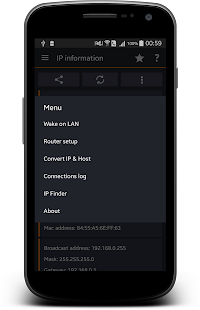
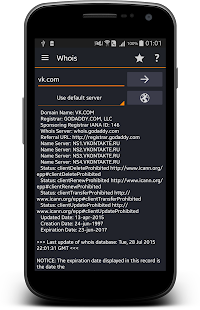
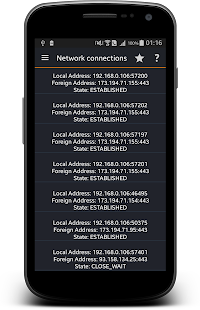
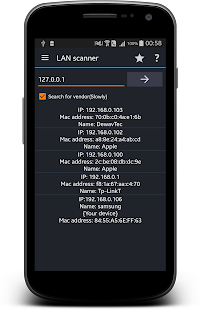
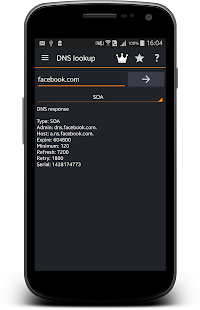
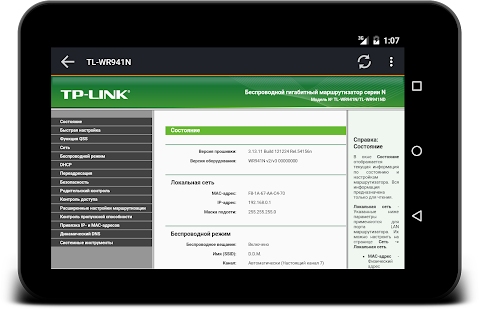
IP Tools is a powerful network utility suite for analyzing and adjusting networks. It allows quick detecting any computer network problems and boosting network performance. This is a must-have app for IT specialists and network administrators.The app combines the most popular network utilities usually found in Windows or Linux. They will help you fix a network problem easily or optimize the network when you are hundreds kilometers away (i.e. not at work :-)).
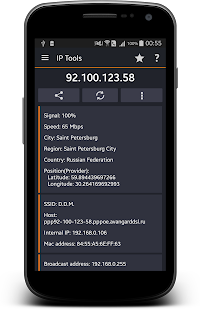
IP Tools has a simple, intuitive interface, so you can receive within seconds full information on your network, find out internal or external IP, SSID, BSSID, broadcast address, gateway, network mask, country, region, city, the provider’s geographical coordinates (latitude and longitude) and other basic information.
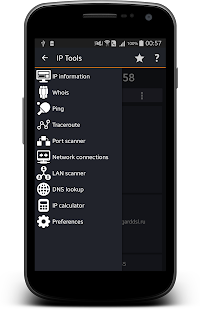
The IP Tools app provides access to the most popular network utilities that administrators and users often use on their computers.
By selecting IP Tools you get the following suite of network tools:
? Ping
? LAN scanner
? DNS lookup
? Port scanner
? Whois – provides information about a website and its owner
? Router setup directly from your smartphone
? Traceroute
? Connection log
? IP Calculator
? IP & Host Converter
? And much more…
These tools will help you get full and clear picture of your network condition. With IP Tools, analysis and optimization are fast, easy and absolutely friendly. The app is improved continuously. Its developers allow for customer opinions and modify the product offering new, more functional and handy versions.
The app’s benefits go far beyond the above list. However, even those mentioned are enough to dismiss doubts, download the IP Tools network utilities to your smartphone and assess advantages from using them right now.
What’s New
? Added basic Android TV support
? Fixed long tap issue(thanks Göran Helsingborg)
? Updated Czech translation (thanks Petr Cízl)
? Updated Swedish translation (thanks Göran Helsingborg)
? Updated Hindi translation (thanks Shrey Doshi)
Screenshots
  • IP Tools: Network utilities Screenshot
  • IP Tools: Network utilities Screenshot
  • IP Tools: Network utilities Screenshot
  • IP Tools: Network utilities Screenshot
  • IP Tools: Network utilities Screenshot
  • IP Tools: Network utilities Screenshot
  • IP Tools: Network utilities Screenshot
  • IP Tools: Network utilities Screenshot
  • IP Tools: Network utilities Screenshot
Download Links
IP Tools: Network utilities v7.0.3 Premium + Key APK / Alternative Link


Get  link for download

Read more »

Wednesday, May 24, 2017

NS2 Mobile ad hoc network MANET Wireless Sensor Network WSN Project topics on IEEE Papers

NS2 Mobile ad hoc network MANET Wireless Sensor Network WSN Project topics on IEEE Papers


NS2 Mobile ad hoc network (MANET) & Wireless Sensor Network (WSN) Project topics on IEEE Papers
-------------------------------------------------------------------------------------------------------------


Steps to install NS2 on ubuntu 16.04


1. A Novel Approach to Trust Management in Unattended Wireless Sensor Networks, IEEE
Transactions on Mobile Computing, 2014 [NS2]

2. An Incentive Framework for Cellular Traffic Offloading, IEEE Transactions on Mobile
Computing,  March 2014 [NS2]

3. Co-evolution of Content Spread and Popularity in Mobile Opportunistic Networks, IEEE
Transactions on Mobile Computing, 2014 [NS2]

4. Designing Energy Routing Protocol with Power Consumption Optimization in MANET,
IEEE Transactions on Emerging Topics in Computing, 2014 [NS2]

5. Dynamic Trust Management for Delay Tolerant Networks and Its Application to Secure
Routing, IEEE Transactions on Parallel and Distributed Systems, 2014 [NS2] 

6. Enabling Reputation and Trust in Privacy-Preserving Mobile Sensing, IEEE Transactions
on Mobile Computing, 2014 [NS2]

7. End-to-End Measurements for Network Tomography under Multipath Routing , IEEE
Communications Letters,  May 2014 [NS2]

8. Iterative Localization of Wireless Sensor Networks: An Accurate and Robust Approach,
IEEE/ACM Transactions on Networking, April 2014 [NS2]

9. Lightweight Privacy-Preserving and Secure Communication Protocol for Hybrid Ad Hoc
Wireless Networks, IEEE Transactions on Parallel and Distributed Systems, 2014 [NS2]

10. Localized Sensor Area Coverage with Low Communication Overhead, IEEE
Transactions on Mobile Computing, 2014 [NS2]

11. Max-Min Lifetime Optimization for Cooperative Communications in Multi-Channel
Wireless Networks, IEEE Transactions on Parallel and Distributed Systems, June 2014
[NS2]

12. Max-Ratio Relay Selection in Secure Buffer-Aided Cooperative Wireless Networks,
IEEE Transactions on Information Forensics and Security, 2014 [NS2]

13. Multiple Network Equilibria with Two-Way TCP Flows , IEEE Communications
Letters , May 2014 [NS2]

14. On the vulnerabilities of the virtual force approach to mobile sensor deployment, IEEE
Transactions on Mobile Computing, 2014 [NS2] 

15. Optimal Probabilistic Encryption for Secure Detection in Wireless Sensor Networks,
IEEE Transactions on Information Forensics and Security, March 2014 [NS2]

16. Privacy-Preserving and Truthful Detection of Packet Dropping Attacks in Wireless Ad
Hoc Networks, IEEE Transactions on Mobile Computing, 2014 [NS2]

17. Secure Continuous Aggregation in Wireless Sensor Networks, IEEE Transactions on
Parallel and Distributed Systems,  March 2014 [NS2]

18. Secure Data Aggregation in Wireless Sensor Networks: Filtering out the Attackers
Impact, IEEE Transactions on  Information Forensics and Security,  April 2014 [NS2]

19. STARS: A Statistical Traffic Pattern Discovery System for MANETs, IEEE Transactions
on Dependable and Secure Computing, 2014 [NS2]

20. Toward Fuzzy Traffic Adaptation Solution in Wireless Mesh Networks, IEEE
Transactions on Computers , May 2014 [NS2]

Get  link for download

Read more »

Monday, May 22, 2017

Network Monitor Mini Pro v1 0 168 Patched Apk Is Here Latest

Network Monitor Mini Pro v1 0 168 Patched Apk Is Here Latest


Network Monitor Mini Pro v1.0.166 Apk Patched Is Here [Latest]

Network Monitor Mini Pro

Overview: We like live statistics. Android do not show network connection statistics on screen. You do not know the current internet bandwidth used for upload and download.
We like live statistics. Android does not show network connection statistics on screen. You do not know the current internet bandwidth used for upload and download.
This is a mini network monitor for your phone. It monitors the upload and download speed per second. It will always stay in the corner of your phone’s screen. You can set the indicator to any corner of the screen, customize the color and transparency of the indicator. In this way, you can enjoy surfing internet, just like what you do in your PC! You can record the live network information for your WiFi / 3G / 4G network speed!
Live Network Traffic Meter (Speed / Data Rate)
Custom Prefix (U: / D: etc.)
Custom Readings Location
Custom Color, Width, Height, Font, Font size, Transparency value
Show on Status Bar
Adjustable Decimal Places (Please turn it off if you have flickering problem)
Adjustable Kilo Value
Hide /s Suffix (per second)
Hide Readings (No Traffic)
Hide when Specific Apps are Running
Hide when Day Dreaming (screen saver – 4.2+)
Beta Test: Traffic Breakdown Mode (traffic by each app)
Beta Test: Interface Breakdown Mode (traffic by each network interface)
Normalize VPN / local proxy / ad blocking loopback traffic
(Pro version support auto-hides when there is no traffic, hide for specific apps and it is ad-free)
Free trial available at:
https://market.android.com/details?id=info.kfsoft.android.TrafficIndicator
4.3+ user with ROOT: You can now download our “Notification Helper” app to hide, force clear, and recover notifications 
http://goo.gl/t5UAgC
Update Log:
1.0.122 Support android 5 / lollipop exception list (require PACKAGE_USAGE_STATS permission)
1.0.104 Interface breakdown mode
1.0.102 Korean (Young-wook Kim)
1.0.100 Width adjustment
1.0.99 Xiaomi fix (a°ç±³a?ç´ ç±³)
1.0.97-98 Djek Energetik (Russian), a*i¨?e?a?? (Japanese), fix for 4.4.2 (service not restart bug, now restart when unlock)
1.0.96 Fix for 4.4
1.0.93
  • Fix for Nexus 5
  • Update Normalization option
    1.0.91 Normalize option for VPN, local proxy, adblocking traffic / widget
    1.0.89
  • Run service in normal priority / hide notification completely (4.3+)
  • Enforced READ_EXTERNAL_STORAGE permission for kitkat (Read SD card font) (4.4+)
  • Fix for Kitkat (4.4)
    1.0.85
  • Advanced color (prefix / network type)
  • Layout (horizontal / vertical)
  • Refresh Interval selection (suggest value is 1)
  • Notification: display IP and network (Require INTERNET, ACCESS_WIFI_STATE PERMISSION)
  • Show ” – ” for zero reading (regular mode only, please config in DP control)
  • Bug fix, and heuristics for beta mode
    1.0.82 Bug fix
    1.0.79 Optimize for HD res
    1.0.78
  • DP option update (disable it to avoid flickering)
  • Beta Testing Mode (for supported devices only)
    1.0.72
  • Notification fix (4.3+)
  • Decimal Places control (DP)
    1.0.70
  • Custom prefix
  • Text transparency
  • Hide when day dreaming (4.2+)
  • Manual input x, y for custom locations

What’s New:

1.0.166 Fix Samsung 2016 July security update issue 1.0.163 Fix nexus 2016 July security update issue 1.0.162 Fix block accept permission button of nexus device (2016 June security update issue) 1.0.160 Add option to add top margin on lock screen (samsung new lockscreen issue) 1.0.159 Samsung users please SHOW the notification to avoid termination ‘1.0.155-158
  • Fix reading disappear after call bug 1.0.152
  • 5.1.1 stability fix
  • IIco Everraert (Nederlands)
 
  • Network Monitor Mini ProNetwork Monitor Mini ProNetwork Monitor Mini Pro
Download Links:
Network Monitor Mini Pro APK / Mirror

Get  link for download

Read more »

Friday, March 31, 2017

Network Monitor Mini Pro v1 0 169 Patched Apk Is Here Latest

Network Monitor Mini Pro v1 0 169 Patched Apk Is Here Latest


Network Monitor Mini Pro v1.0.166 Apk Patched Is Here [Latest]

Network Monitor Mini Pro

Overview: We like live statistics. Android do not show network connection statistics on screen. You do not know the current internet bandwidth used for upload and download.
We like live statistics. Android does not show network connection statistics on screen. You do not know the current internet bandwidth used for upload and download.
This is a mini network monitor for your phone. It monitors the upload and download speed per second. It will always stay in the corner of your phone’s screen. You can set the indicator to any corner of the screen, customize the color and transparency of the indicator. In this way, you can enjoy surfing internet, just like what you do in your PC! You can record the live network information for your WiFi / 3G / 4G network speed!
Live Network Traffic Meter (Speed / Data Rate)
Custom Prefix (U: / D: etc.)
Custom Readings Location
Custom Color, Width, Height, Font, Font size, Transparency value
Show on Status Bar
Adjustable Decimal Places (Please turn it off if you have flickering problem)
Adjustable Kilo Value
Hide /s Suffix (per second)
Hide Readings (No Traffic)
Hide when Specific Apps are Running
Hide when Day Dreaming (screen saver – 4.2+)
Beta Test: Traffic Breakdown Mode (traffic by each app)
Beta Test: Interface Breakdown Mode (traffic by each network interface)
Normalize VPN / local proxy / ad blocking loopback traffic
(Pro version support auto-hides when there is no traffic, hide for specific apps and it is ad-free)
Free trial available at:
https://market.android.com/details?id=info.kfsoft.android.TrafficIndicator
4.3+ user with ROOT: You can now download our “Notification Helper” app to hide, force clear, and recover notifications 
http://goo.gl/t5UAgC
Update Log:
1.0.122 Support android 5 / lollipop exception list (require PACKAGE_USAGE_STATS permission)
1.0.104 Interface breakdown mode
1.0.102 Korean (Young-wook Kim)
1.0.100 Width adjustment
1.0.99 Xiaomi fix (a°ç±³a?ç´ ç±³)
1.0.97-98 Djek Energetik (Russian), a*i¨?e?a?? (Japanese), fix for 4.4.2 (service not restart bug, now restart when unlock)
1.0.96 Fix for 4.4
1.0.93
  • Fix for Nexus 5
  • Update Normalization option
    1.0.91 Normalize option for VPN, local proxy, adblocking traffic / widget
    1.0.89
  • Run service in normal priority / hide notification completely (4.3+)
  • Enforced READ_EXTERNAL_STORAGE permission for kitkat (Read SD card font) (4.4+)
  • Fix for Kitkat (4.4)
    1.0.85
  • Advanced color (prefix / network type)
  • Layout (horizontal / vertical)
  • Refresh Interval selection (suggest value is 1)
  • Notification: display IP and network (Require INTERNET, ACCESS_WIFI_STATE PERMISSION)
  • Show ” – ” for zero reading (regular mode only, please config in DP control)
  • Bug fix, and heuristics for beta mode
    1.0.82 Bug fix
    1.0.79 Optimize for HD res
    1.0.78
  • DP option update (disable it to avoid flickering)
  • Beta Testing Mode (for supported devices only)
    1.0.72
  • Notification fix (4.3+)
  • Decimal Places control (DP)
    1.0.70
  • Custom prefix
  • Text transparency
  • Hide when day dreaming (4.2+)
  • Manual input x, y for custom locations

What’s New:

1.0.166 Fix Samsung 2016 July security update issue 1.0.163 Fix nexus 2016 July security update issue 1.0.162 Fix block accept permission button of nexus device (2016 June security update issue) 1.0.160 Add option to add top margin on lock screen (samsung new lockscreen issue) 1.0.159 Samsung users please SHOW the notification to avoid termination ‘1.0.155-158
  • Fix reading disappear after call bug 1.0.152
  • 5.1.1 stability fix
  • IIco Everraert (Nederlands)
 
  • Network Monitor Mini ProNetwork Monitor Mini ProNetwork Monitor Mini Pro
Download Links:
Network Monitor Mini Pro APK / Mirror

Get  link for download

Read more »