

Showing posts with label recorder. Show all posts
Showing posts with label recorder. Show all posts
Tuesday, October 10, 2017
Thursday, July 6, 2017
Easy Voice Recorder Pro v1 7 5b Full Apk Download
Easy Voice Recorder Pro v1 7 5b Full Apk Download
Today i want to share a great andriod application that name is Easy Voice Recorder Pro v1.7.5b Full Apk Download
To Know More Details Easy Voice Recorder Pro v1.7.5b Full Apk Download Click Here
So no more late quickly download this Easy Voice Recorder Pro v1.7.5b Full Apk Download and enjoy
Click Here Easy Voice Recorder Pro v1.7.5b Full Apk Download
Get link for download

Monday, June 19, 2017
Automatic call recorder pro v3 74 apk free download
Automatic call recorder pro v3 74 apk free download

Automatic Call Recorder Pro Apk - Record any phone call you want and choose which calls you want to save. You can set which calls are recorded and which are ignored. Listen to recording, add notes and share it. Integration with Google Drive and Dropbox allows calls to be saved and synchronized to the cloud as well.
Recorded calls are stored on the inbox. You can change the destination recordings to folder to an external SD card as well. You can set the size of the inbox. The number of saved calls is limited only by your device memory. If you decide that a conversation is important, save it and it will be stored in the saved calls folder. If not, old recordings will be automatically deleted when new calls fill up the inbox.
You can enable a call summary Menu with options to appear immediately after a call. Search for recordings by contact, phone number or note.
There are 3 default settings for automatic recording:
- This setting records all calls except for contacts pre selection to be ignored
- This setting records no calls except for contacts pre selected to be recorded
- This setting records all calls with people who are not contacts, except for contacts pre selected to be recorded.
What’s New in v3.74 Apk
Support for additional languages - You can change languages in the settings Bug fixes In previous versions: Show the call subject in the list of recordings - turn on this feature in the settings Search by subject Improved integration with Dropbox
in order to use Automatic Call Recorder for pc you can download any android emulater on windows just like bluestacks and youwave or you can use android sdk.
And you may have to download Automatic Call Recorder 3.74 apk file to access the app without sign in google play.
Download Automatic call Recoder
Download now
Get link for download
Thursday, June 15, 2017
AZ Screen Recorder Premium – No Root v4 1 Apk Latest
AZ Screen Recorder Premium – No Root v4 1 Apk Latest

AZ Screen Recorder – No Root
Featured on Google Play Home Page, Android Police, Yahoo News, CNET, Android Central, Droid-Life and more.
AZ Screen Recorder is the best app to record the screen of your Lollipop. It does NOT require root access, no time limit, no watermark, ad free and very easy to use with one action to start and stop recording.
This screen recording app will let you make beautiful screencast videos by providing every feature that you need in a simple and elegant user experience design.
This screen recording app will let you make beautiful screencast videos by providing every feature that you need in a simple and elegant user experience design.
AZ screen recorder lets you record your screen to HD and FullHD videos and it is the only screencast app in the Android market that can be paused and resumed while recording.
You can also record audio from the mic and it is automatically muxed into the screencast videos. That makes it very convenient to create tutorial, promotional video, comment about your game and gameplay or record video chat.
The floating window always staying on top will let you snap at the exact moment on any screen.
In the settings, you can enable screen touches so the people who are watching your videos will know exactly what you are doing.
Additionally, there are many other features in this free screen recorder such as setting video resolution, bit-rate, screen orientation, customized timer to stop, saving directory selection, view/share or delete your recorded videos… All of them are free for you!
How to install?
- Save the downloaded .apk on your android phone’s SD card
- Install it Normally.
- That’s it, Enjoy!
Screenshots


Download
AZ Screen Recorder premium– No Root APK (3.6 MB) / Mirror
Get link for download
Wednesday, April 12, 2017
Call Recorder APK
Call Recorder APK
Call Recorder APK
Note: In case recording not work on SamSung, KitKat and above devices try these recommended settings: GO to Setting and change Audio source: Voice Call, Format: MP4, Quality: 11 Khz and check auto speaker on option.
this recording app will record incoming and out going calls automatically.
- Record you all calls automatically.
- Search your all calls automatically.
- Either option for you to record incoming, outgoing or select date or time as you wish.
- Share recording to Bluetooth , message etc.
- Play, save and delete call recording.
- Ignore recording for specific contract or number.
- See callers history.
- Different options of audio quality are available.
- You can give commend for recording or not in any call.
- lot of more only for you.

Latest Version: 1.1.17
Publish date: 21-07-2016
Size: 2.27 MB
Require: Android 2.3.2

Previous Versions:
Call Recorder APK1.1.16 dated 25-05-2016
Call Recorder APK1.1.16 dated 25-05-2016
Get link for download
Sunday, March 26, 2017
AZ Screen Recorder Premium – No Root v4 1 1 Apk Latest
AZ Screen Recorder Premium – No Root v4 1 1 Apk Latest
AZ Screen Recorder – No Root
Featured on Google Play Home Page, Android Police, Yahoo News, CNET, Android Central, Droid-Life and more.
AZ Screen Recorder is the best app to record the screen of your Lollipop. It does NOT require root access, no time limit, no watermark, ad free and very easy to use with one action to start and stop recording.
This screen recording app will let you make beautiful screencast videos by providing every feature that you need in a simple and elegant user experience design.
This screen recording app will let you make beautiful screencast videos by providing every feature that you need in a simple and elegant user experience design.
AZ screen recorder lets you record your screen to HD and FullHD videos and it is the only screencast app in the Android market that can be paused and resumed while recording.
You can also record audio from the mic and it is automatically muxed into the screencast videos. That makes it very convenient to create tutorial, promotional video, comment about your game and gameplay or record video chat.
The floating window always staying on top will let you snap at the exact moment on any screen.
In the settings, you can enable screen touches so the people who are watching your videos will know exactly what you are doing.
Additionally, there are many other features in this free screen recorder such as setting video resolution, bit-rate, screen orientation, customized timer to stop, saving directory selection, view/share or delete your recorded videos… All of them are free for you!
You can also record audio from the mic and it is automatically muxed into the screencast videos. That makes it very convenient to create tutorial, promotional video, comment about your game and gameplay or record video chat.
The floating window always staying on top will let you snap at the exact moment on any screen.
In the settings, you can enable screen touches so the people who are watching your videos will know exactly what you are doing.
Additionally, there are many other features in this free screen recorder such as setting video resolution, bit-rate, screen orientation, customized timer to stop, saving directory selection, view/share or delete your recorded videos… All of them are free for you!
How to install?
- Save the downloaded .apk on your android phone’s SD card
- Install it Normally.
- That’s it, Enjoy!
Screenshots
Download
AZ Screen Recorder premium– No Root APK (3.6 MB) / Mirror
Get link for download
Tuesday, March 14, 2017
Automatic Call Recorder APK
Automatic Call Recorder APK
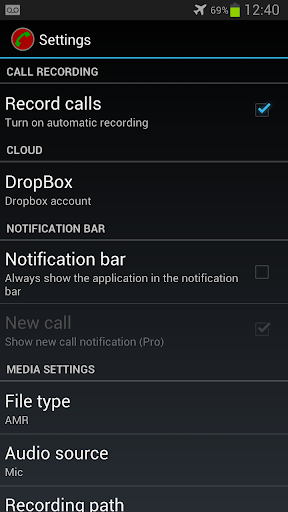
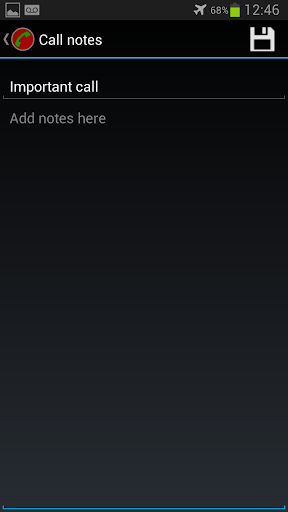
In this ad free pro version you can automatically save calls from a contact and add comment to a recorded call.
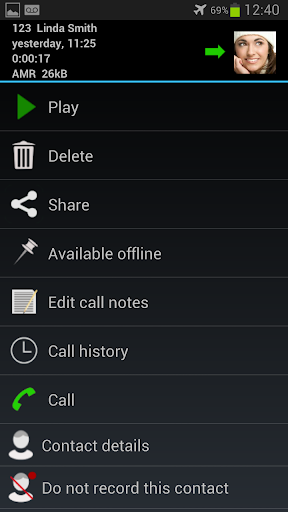
You can also stop a recording in progress or start recording when a call is in progress.
Record all desired calls on your phone.
Select which calls to record:
You can record all calls or only those that are from numbers that are not in your contacts.
You can also stop a recording in progress or start recording when a call is in progress.
Record all desired calls on your phone.
Select which calls to record:
You can record all calls or only those that are from numbers that are not in your contacts.
You can play, save and share the recorded calls.
Please note that on some devices recording a call is no possible so please try the free version first.
Auto call recorder also supports wav , ANR, 3gp formats.
Recording on an external sd card or any location desired is also possible.
The audio source is now configurable.
For playing the 3gp format you can use the "MX Video Player".
If you have a problem with the recording, please try to record with a different audio source,
which you can configure in the settings tab.
Try to record with speaker on or off , until you find the best combination for your phone.
For example you can try Audio Source -> Voice UpLink and speaker off.
Whats in this version: (Updated : Jan 16, 2014)
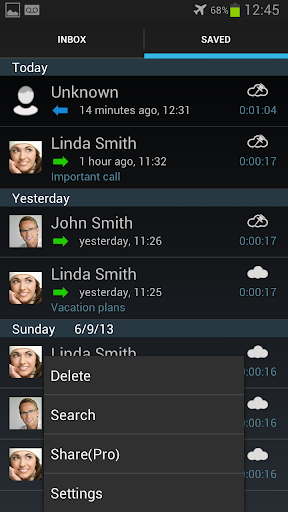
- Google Drive™ integration - sync recordings to Google Drive (Only for Android versions 3.0 and above)
- Dropbox integration improvements
- UI Improvements
- New edit mode - Now you can delete, share (Pro) and save (Pro) multiple recordings in the same view
- Bug fixes
Required Android O/S : 2.1+
Download : 2.2Mb APK
Get link for download
Subscribe to:
Posts (Atom)