Showing posts with label scanner. Show all posts
Showing posts with label scanner. Show all posts
Wednesday, December 26, 2018
Genius Scan PDF Scanner 1 3 APK Android
Genius Scan PDF Scanner 1 3 APK Android
Download Genius Scan+ PDF Scanner apk version 1.3 free for your android.

Genius Scan+ - PDF Scanner 1.3 APK
Requirements: Android 2.2 and up
Size: 6 MB
Rating: 4.5/5
Type: Productivity
? User reviews from the Play Store: ?
"Saved my job! My position required me to send written documents each day, and I didnt have access to scanners or fax. This allows good quality docs with multiple pages in one folder. Love this app. " --Event Vixen INC.
"Great app Its so awesome! We use it to take pics of receipts so we can file them electronically rather then stuffing them in a drawer somewhere. Great way to organize! Hope" --Roldan Hua
"A lifesaver! This is the first app Ive ever purchased. I use it all the time. Excellent way to convert hard copy into digital files." --Lisa Sassaman
" the best part of this app is the ability to create multi-page PDFs and easily upload to Drive. I can still share to Evernote when I want. The cropping usually works well. "--Brian Cavanaugh
?Other Reviews?
"This is an absolutely amazing app." - AppSafari.com
"Next time you plan to hit the road dont forget to download a copy of Genius Scan to make life easier for yourself and your accounting department". - AppPicker.com
User reviews:
"Great scanner! It replaced my flatbed scanner for all my documents"
"This scanner app works great and is easy to use. I played with it for a few minutes and actually got some work done. Superb!" - rafirondon
"One word: awesome... and useful" - farewellraymond
DESCRIPTION & FEATURES:
Genius Scan+ is a scanner in your pocket. It enables you to quickly scan documents on the go and email the scans as JPEG or PDF with multiple pages.
In addition, Genius Scan+ integrates with Box, Dropbox, Evernote or any other cloud service app installed on your Android phone to let you export your scans wherever you want.
The Genius Scan scanner technology includes smart page detection, perspective correction, image post-processing. Typically, when you take a photo of a picture, you are not perfectly aligned and the light is not perfect. Genius Scan takes care of that for you.
Still not convinced? Genius Scan has more than 10 million users and has been featured multiple times.
But first, the key features (aka.: what makes this scanner different from the camera)
- Detects page frame and corrects perspective
- Enhances the scan with color or black-and-white post-processing
- Emails the scans as JPG or PDF
- Creates PDF documents with multiple scans
- Export documents to any app supporting JPG or PDF files
- Documents are processed on the phone, not sent to a third-party server
Wondering how our users use Genius Scan?
- To quickly scan a form you just printed when you don’t have a scanner
- At the university, to take a picture of a whiteboard
- On the road, to archive receipts
- To make a copy when you have no copier available
- To archive handwritten notes or share them with colleagues
- Save the perfect recipe after cooking
- Save handwritten memos, or book pages for future reference
- Share a good restaurant menu on Twitter
What’s new in version 1.3
- Fix: allow for non-English characters in document or scan title
- New export dialog allowing to edit the exported file name and size
- Display disk space used by the app in settings
- Ability to change the default enhancement and image quality
- New help interface
- Fix: correct orientation when importing a picture from gallery
Screenshots (click to enlarge)


Google Play Store Link
Download Multiupload
Download [Mirror 1] Zippyshare
Download [Mirror 2] Sharebeast
Download [Mirror 3] Sendspace
- The games and apps on this site are meant for TESTING, FEEDBACK and PROMOTIONAL purposes only. If you like a game or app then please buy it from GOOGLE PLAY STORE and Support the Developers whose software you actually enjoy!
Get link for download

Saturday, September 8, 2018
Scanner Radio Pro 4 0 APK
Scanner Radio Pro 4 0 APK
Download Scanner Radio Pro APK version 4.0 free for your android. Live audio feed from over 4,000 police and fire scanners, weather radios, amateur radio repeaters, etc. (No Ads)

Scanner Radio Pro 4.0 APK
Requirements: Android 1.6 and up
Size: 1.5 MB
Rating: 4.6/5
Type: Entertainment
? User reviews from the Play Store: ?
"Great scanner ! Awesome app! Great for both police/emergency broadcast & weather as it broadcast NOAA Weather Radio both free & paid versions of this app. " --Barbara Lint
"Informative&Entertaining Not only does this app give u access to over 1000 radio feeds that could alert you to disasters,crime and bad weather...but this app is loads of fun too!!" --A Google User
"Great for local weather When the weather turns bad,I listen to the local 911 to know where tornadoes and bad storms are." --Axl Myk
"This is the best scanner app on Android hands down. Reliable and easy to use, have used the pro version for two years now." --Robert Gapen
DESCRIPTION:
Listen to live audio from over 4,100 police and fire scanners, weather radios, and amateur radio repeaters from around the world (primarily in the United States and Australia, with more being added daily) on your phone.
Features at a glance:
* View scanners that are located nearest you, sorted by distance.
* View the top 50 scanners that have the most listeners (list updated every 5 minutes).
* View list of scanners added most recently (new additions are being added all the time).
* Add scanners you listen to the most to your Favorites list for quick access.
* Browse the directory of scanners by location or genre (public safety, air traffic, weather, railroad, etc).
* Enable notifications to be notified when lots of people (such as over 1000, for example) are listening to any scanner (indicating that something big is happening). You can also be notified when scanners located near you (or specific scanners of your choosing) have more than a certain number of listeners.
* Add Scanner Radio Pro widgets and shortcuts to your phones home screen for quick access (app cannot be installed on SD card to access them).
* Add a "Scanner Radio Pro Favorite" shortcut to your home screen to launch a scanner feed via an alarm clock app or automation app.
* Listen to Broadcastify.coms audio archives to listen to audio thats been archived over the past 30 days. Note: You *must* have an account on Broadcastify.com and purchase their "Premium Membership" ($15 for 6 months) in order to access their archives using the app.
In addition to the above features, you also get the following features with this version of the app:
* The ads are removed.
* The play button at the top of the directory screens and on the widgets can be used to start listening without having to go to the player screen.
* With the "Scanner Radio Pro Locale PlgIn" plug-in is also installed you can have Locale/Tasker launch the app and have one of your Favorites automatically begin playing based on one or more conditions or have the app stop playing. One use for this feature is to have a scanner feed begin playing when your phone connects to a specific Bluetooth device and then have it stop when the connection to that Bluetooth device is no longer present.
The audio is provided by volunteers (primarily for Broadcastify.com) using real scanner radios.
If you need assistance, please contact me at android-support@gordonedwards.net
Explanation of why various permissions are needed:
The "Phone Calls / Read Phone State" permission is needed by the app so that it can detect when youre placing a phone call (or when one is being received) so that it can automatically stop the streaming of the audio to prevent it from interfering with the call.
The "Fine (GPS) Location" and "Coarse Location" permissions are required so that the app can determine what scanners are located in your area when you click on "Near Me". When you click on "Near Me" the app first attempts to determine your location via the network, if that fails the app then tries to determine your location via GPS.
The "Automatically Start at Boot" permission is required so that a small portion of the app can be started when your phone boots if (and only if) you turn on the notifications feature of the app (that feature is turned off by default).
If the audio repeats or the app stays connected for only a short time, try returning to a directory screen in the app, then select "Settings" from the menu, then "Player settings", and then try changing the "Streaming method" setting.
What’s new in version 4.0
- Fixed a problem where “PM” was always displayed with timestamps on the “Broadcastify.com Alerts” screen for devices running Android 4.3.
- Fixed a bug which prevented the Locale plug-in from being able to retrieve favorites from the app when they’re not in the cache.
- Fixed a couple of other miscellaneous bugs.
Major user interface refresh for people running Android 4.0 and later.
Screenshots (click to enlarge)


Scanner Radio Pro 4.0 APK Download Links:
https://play.google.com/store/apps/details?id=com.scannerradio_pro
Download Multiupload
Download [Mirror 1] Zippyshare
Download [Mirror 2] Sharebeast
Download [Mirror 3] Sendspace
Download [Mirror 4] mirrorcreator
- The games and apps on this site are meant for TESTING, FEEDBACK and PROMOTIONAL purposes only. If you like a game or app then please buy it from GOOGLE PLAY STORE and Support the Developers whose software you actually enjoy!
Get link for download
Sunday, April 23, 2017
Scanner Radio Pro v6 1 6 Apk Is Here ! Latest
Scanner Radio Pro v6 1 6 Apk Is Here ! Latest

Scanner Radio Pro
Listen to live audio from over 2,900 police and fire scanners, weather radios, and amateur radio repeaters from around the world (with more being added daily).
Features
- * Add scanners you listen to the most to your Favorites list for quick access.
* View scanners that are located nearest you, sorted by distance, by clicking on “Near Me”
* View the top 50 scanners that have the most listeners (updated every 5 minutes).
* View list of scanners added most recently (new additions are being added all the time).
* Browse the directory of scanner feeds by location or by genre (public safety, weather, railroad, etc).
* Configure alerts to have the app notify you when lots of people are listening to a scanner (indicating that something big may be happening).
* Add Scanner Radio widgets and/or shortcuts to your phone’s home screen for quick access.
* Add a “Scanner Radio Favorite” shortcut to your home screen to launch a scanner feed via an alarm clock app or automation app.In addition to the above features, you also get the following features with this version of the app:* The ads are removed.
* Allows you to specify what times of day you want to receive listener alerts.
* Allows you to setup listener alerts for scanners located near you.
* The play button at the top of the directory screens and on the widgets is functional.
* Allows you to listen to archived audio (from the past 30 days) if you have a RadioReference.com Premium Subscription. Their premium subscription is $15 for 6 months, without it you will not be able to access their audio archives using the app.
What’s New
•Changed the default listener alert threshold from 2500 to 3500.
The sleep timer button (the ‘Zzz’ button) is now colored when the timer is active.
The sleep timer no longer turns off if you change which scanner you’re listening to.
If an entry is favorited/unfavorited on the Broadcastify Alerts screen, all occurrences of the selected scanner are updated.
Fixed some push notification bugs and improved efficiency.
Several crash fixes.
Improved look and feel.
• Fixed a bug which can cause the player to start playing audio after returning to the app after previously stopping the player via the button on the notification.
• Added a message to be displayed when servers are temporarily unavailable due to over capacity.
• “Unmute” button no longer included on alert notification if alerts aren’t configured to be audible.
• Added “Pro” badge to app icon.
How to Install?
- Download Apk (link below).
- On your Android device, go to settings > security > allow unknown sources.
- Find downloaded APK on your phone and install it.
- All Done. Enjoy!
Screenshots

Download Links
Scanner Radio Pro | Mirror
Get link for download
Sunday, April 2, 2017
Handy Scanner Pro PDF Creator v2 0 Apk Direct 2Mb
Handy Scanner Pro PDF Creator v2 0 Apk Direct 2Mb
Description
Handy Scanner turns camera pictures into print-ready PDF documents.
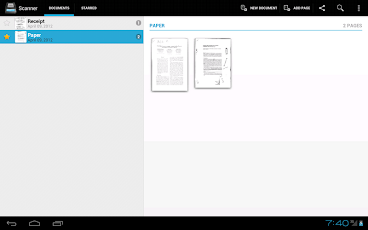
Handy Scanner Pro turns your phone or tablet into a powerful document scanner. Say goodbye the piles of paper that follow you around. You can scan multipage documents, whiteboards, business cards and so much more. The post-processing filters give you the greatest quality with the lowest background noise.
Then, just share them to GMail, Dropbox or any other application. Better yet, use instant uploading to Dropbox! Produces both PDF and JPEG images!
? Handy Scanner is both easy to use and efficient. Were still amazed of its performance
AndroidZoom.com
? Handy Scanner Makes Scanning Documents With Your Camera Fun Again
androidpolice.com
? Handy Scanner, it straightens and fixes perspectives, enhances readability, makes multi-page documents easy, and pushes PDFs quickly to wherever youd like.
lifehacker.com
? Scan Documents
» Take several pictures in a row (batch scan) with our custom camera.
» Automatic document bounds detection
» Improve readability with our filters (print-ready, enhance colors/contrast,...)
» Export documents to PDF or JPEG format (to Dropbox, Box, Gmail, GDocs, …)
» OCR your documents by sharing to the Google Docs application and selecting “Convert to Google Doc”
? Manage
» Search your documents
» Post-process documents again
? Why you should get Handy Scanner Pro
» No limits, free version gets you 20 Documents, 5 pages per Document
» Unlimited camera shots in a row (3 in the free version)
» Access the highest quality results (low and medium quality available for free users)
» Fine-tune your images by settings contrast/brightness
» Remove all watermarks from PDF files
» Remove advertisements
» To help us keeping this amazing app alive and kicking.
DOWNLOAD
Handy Scanner Pro PDF Creator Apk
Get link for download
Subscribe to:
Posts (Atom)