Showing posts with label windows. Show all posts
Showing posts with label windows. Show all posts
Friday, March 30, 2018
Net Framework 3 5 Setup For Windows 8 And Windows 8 1 X86 X64
Net Framework 3 5 Setup For Windows 8 And Windows 8 1 X86 X64

DOWNLOAD
Windows 8
https://www.mediafire.com/?11a9v8r1g7y8wvb
Windows 8.1
https://www.mediafire.com/?i7r29427vnhi1pm
Get link for download

Tuesday, July 11, 2017
Windows 8 Pro And Windows 8 1 Pro Core Installation Key Activator And NET Framework 3 5 Offline Enable
Windows 8 Pro And Windows 8 1 Pro Core Installation Key Activator And NET Framework 3 5 Offline Enable

Windows 8 Pro And Windows 8.1 Pro
Windows 8 Pro And Windows 8.1 Pro/Core Installation Key And Activator
And
NET Framework 3.5 Offline Enable
For Windows 8 Pro And Windows 8.1 Pro
How To Use
-After Install Windows 1st Start Activator With Administrator
-After Activate Windows
-Enable NET Framework 3.5 Offline

Get link for download
Friday, June 30, 2017
How to Reset Your Windows Password Without an Install CD
How to Reset Your Windows Password Without an Install CD
If you’ve forgotten your Windows password and you don’t have an install CD laying around, there’s no need to worry. Not only are there half a dozen complicated ways to reset the password, you can do it easily with the Offline Windows Password editor.
Of course, if you do have a Windows CD, you can reset your password the easy way with a simple trick.
Note: this should work on all versions of Windows, but if you are running Windows 8 or 8.1 andalso using a Microsoft Account to login to your computer, you’ll need to reset your Microsoft Account password using a web browser on their web site.
Create the Boot Disk
You’ll need to create a boot disk using another PC. If you don’t have another PC, you’ll have to bug one of your friends to use theirs. First, you’ll need to download the boot disk from here:
Download the Offline NT Password & Registry Editor

Then download and launch ImgBurn, which is a really simple piece of software that helps you burn an ISO image to a disk. Note: if you have some other application for burning an ISO image, you can use that instead.
Choose the Source, click the burn button, and create the boot disk.

You could also create a bootable USB drive instead if you’d like, the instructions are on the Offline NT download site.
Resetting Your Windows Password
Boot your PC from the boot disk (you might have to adjust the BIOS to allow booting from the CD). You’ll be prompted at a couple of screens, which you can generally just hit the Enter key at. For instance, this screen asks if you want to select the first partition, and [1] is already selected, so just hit Enter.

The same thing happens at the next step, where you have to choose the path to your registry. The default is fine, so hit Enter.

Next you can choose whether to use password reset or some other thing, so just hit Enter for password reset.

Next you’ll be prompted whether you want to edit users or the registry. You want to edit user passwords, so hit Enter again.

And now, the first screen where you’ll need to do something other than hit the Enter key. In this case, you’ll want to type the username that you want to reset. In my case, this was “geek”, so I just typed that (without the quotes). Then hit Enter.

Now you’ll want to probably just blank the password, which is already selected, so hit the Enter key again (you can always change it once you’re back in Windows).

And now, you’ll have to save what you just did. So type an exclamation point to quit (or the “!” symbol), then type the letter “y” to save.

At this point it should say “EDIT COMPLETE”, and you can reboot your computer. You should be able to login without any problems—just make sure to go set a new password.
Get link for download
Thursday, June 15, 2017
BBM Mod Tema Windows 10 Versi 2 11 0 18 apk
BBM Mod Tema Windows 10 Versi 2 11 0 18 apk
Free Download BBM Mod Tema Windows 10 Versi 2.11.0.18 apk

Fitur BBM :
- Versi 2.11.0.18 Apk
- Full DP On/Off
- dan lain-lain
Sekian ulasan dari admin tentang Download BBM Mod Apk yang berjudul BBM Mod Tema Windows 10 Versi 2.11.0.18 apk , semoga bermanfaat bagi sobat semua dan terima kasih atas kunjungannya.
Link Download
Download BBM Mod Tema Windows 10 Apk
Get link for download
Saturday, April 22, 2017
ADVANCED Codecs for Windows 7 8 10 Download
ADVANCED Codecs for Windows 7 8 10 Download
Windows 7/8/10 advanced Windows audio and video codec encoder package. Includes both 32 and 64 bit versions. Kodak Technical Release Titles Only LAV filters and XY-VSFilter is a complete set of standard codecs.
 |
| Download ADVANCED Codecs for Windows 7 / 8 / 10 |
Most Popular Kodak plans to continue on your computer before installing the automatic installer compact yet comprehensive package.
Kodak at one time or another has been a problem for the average consumer. The average computer user to install and only one out of the box, and maybe it has been solved, everything to work properly. There are several solutions to the satisfaction of the code package, but no, I did everything he wanted. I just / wanted and most of the time, the file still quota system, or for re-installation is required to obtain the coder did not play well. The disappointment was the basis to start creating a codecpack work with all players.
Automatic Installer, the most popular Kodak plans to release your computer before installing the Windows Media Center setup package list yet.
Author: Shark007
Date: 10/18/2014
Size: 51.8 MB
Requires: Win 10 / 8 / 7
Free Download
Get link for download
Monday, April 10, 2017
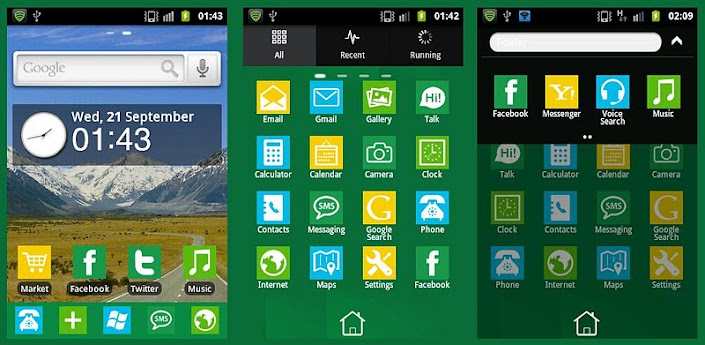
WINDOWS 8 GO LAUNCHER THEME
WINDOWS 8 GO LAUNCHER THEME
WINDOWS 8 GO LAUNCHER THEME
Description
Windows 8 GO launcher Theme enjoy PC LOVER !About Windows 8 :Windows 8 is the codename of the next version of Microsoft Windows, a family of operating systems produced by Microsoft for use on personal computers,
including home and business desktops, laptops, netbooks, tablet PCs, servers, and media center PCs.
***This app only works with GO Launcher EX.
***Install GO Launcher free from the market first.
***How to Apply the Theme:
1.Please Do Not open directly after its installed.
2.Back to GO Launcher EX: MENU > theme preferences.
3.Choose and apply the theme.
Download here
Get link for download
Wednesday, March 15, 2017
Clash of Clans Snapchat Many More for Windows Phone ! LEAKED All for noobs Exclusive
Clash of Clans Snapchat Many More for Windows Phone ! LEAKED All for noobs Exclusive
Convert any Android app to Windows Phone app
Waiting for your favorite android apps to be released on windows store? No more worries!
Using the tool given below, you can install any android app Clash of clans, Snapchat on windows phone 10.
How to Install?
- Download the archive WP Tools by All For Noobs from link given below
- Unzip the archive
- Open the folder wconnect, and install IpOverUsbInstaller.msi and vcredist_x86.exe
- Open the Windows 10 Mobile’s Settings page ->Update & Security > For Developers and enable Developers Mode, as well as Device Discovery
- Open the extracted wconnect folder, open an elevated command prompt (Shift+right click > Open command window here)
- Then you’ll need to connect to the phone — (USB method is recommended):
- To Connect using USB, type wconnect.exe usb and hit enter
- Then it’ll ask for the pairing code, enter the code and hit enter
- Then navigate to the extracted adb folder and open an elevated command prompt
- To make sure that your device is connected, type adb devices and hit enter to show the list of devices that are connected
- Place the APK file that you want to install on the same directory (adb folder) and type the following command:adb install APKNAME.apk (replace APKNAME with the APK file’s name)
- That’s it! You can now install the APKs on your windows phone 10
Screenshots


List of supported devices:
- Nokia Lumia 920
- Nokia Lumia 925
- Nokia Lumia 929 (icon)
- Nokia Lumia 830Nokia Lumia 1520
- Nokia Lumia 730
- Nokia Lumia 820
- Nokia Lumia 435
- Nokia Lumia 928
Note-
This tool will only work with latest WP 10 10166 Build.
We are not responsible for any damage to your device while using this tool.
Apps which require google play services may not operate properly
Download Link
WP Tool
Get link for download
Subscribe to:
Posts (Atom)