Showing posts with label without. Show all posts

Friday, June 8, 2018

Android phone ko root kaise kare without PC 100 percent working trick

Android phone ko root kaise kare without PC 100 percent working trick


HELLO  Friends Aj hm apko Is Article me batayengy apne Android phone ko root kaise kare kya hai maine dekha hai jyadatar log apne phone ko root ni kar pate hai kyu ki jitne bhi tarike bataye jate hai internet par bo kisi particular android model me to work karte hai but ye jaruri nhi hai ki bo method sabhi phone me supported ho chaliye sabsy pehly jan lete hai phone root kya hai android phone me kuch limits hoti hai jisse hm system tak ni pahuch sakte usi system tak pahuchne k liye hum apna phone ko root karte hai aur agar hm uski system tak apni pahuch bana le to hm bahut kuch kar sakte hai  jab hamara phone root ho jata hai to bo limits ko break kr deta hai aur hum apne phone me system tk pahuch jate hai yani hm apne phone me RAM increase kr skte hai aur bi bhut kuch kar skte hai aj kal jyadatar application rooted phone ke liye hote hai isliye hmara phone root hona jaruri hai

Root karne se Fayde

* Root karne se sabse acha fayada hota hai ki hum apne phone saved hue wifi ka pasward dekh sakte apne 
   phone ki RAM badha skty hai jisse hamara phone hang  ni hoga aur hamare phone me ache se game khel skte hai kam RAM hone ki bajah se  hamare phone me game ya koi apps sai se support ni karta , root karne se hum wifi bhi hack kar sakte


 * Root karne se hm apne phone ki internal memory badha skte hai pehly jo phone aate the unme bhut km internal memory ki bajah se usme hm big game ni khel skte jaise gta vicecity, asphalt8 aur bi bhut se game lakin root karne k bad ye kam bi mumkin hai

* sabse achi bat to ye hai root karne k bad hm apne phone ka OS version bi change kar skty hai yani hm apne phone ko manually update kar skte kuch phone hai jinme updating ni aati hai jaise galaxy core2,galaxy coreprime, inko hm manually update kar sakte  apne kitkat version se lolipop version me change kar sakte hai


 Isey bi padhe

mcent se paise kaise kamaye

Ek mobile me do whatsapp chalaye

Root karne se Nuksan


* Android phone ko root karne k bad apke apne phone ki warranty chali jayegi kyu ki kuch mobile company rooting ki permision ni deti aur baki koi bada nuksan ni hota kyu ki maine apni life me bhut se phone root kiye hai koi  problem ni hui muje root karne me aur na hi phone me 

Must Read :

*. Ek esa application jisse hazaro rupees kamaye per month

*. Gta liberty city kaise chalaye Android phone me

Kingroot app se phone root kare


kingroot ki help se sbhi phone root ho jate hai ye app bi jyadatar phone model me support krta hai kyu ki maine jyada tar isi software ki help se phone root kiye hai ap bi try kar lijiye step by step samajhte hai

step(*) sabse pehle kingroot app download karna hoga niche di hui link se ap download kar sakty hai

step(*) ab apne mobile data ko on kare fir kingroot app ko open kare

step(*) jaise hi ap open karoge apke phone par ek bada sa option dikhega Root your phone simply uspe click kariye apka phone root hona start ho jayga 

step(*) thodi der bad apka phone successfully root ho jayga ab bas ap apna phone restart kariye apka phone root ho gya 

Download now kingroot


Agar apka phone kingroot app se na root ho to ap in software ko bi try kar le 


framaroot ko download karne ke liye yha click kare download farmaroot


Z4Root ko download karne ke liye yha click kare download Z4root


Towel root download karne ke liye yha click kare download towelroot


Agar ye app yha se na download ho to ap inhe google me search karke download kar le 

Agar apke phones me ye method work na kare to ap dusri post padhiye usse apka phone root ho jayegaClick here for Read post


I hope apko ye post achi lagi  hogi agar apka koi internet se related sabal ho to ap hamare comment box me comment kare hm apke sabal ka reply jarur dengy  hamara fb page like karna na bhule hamari ye post dusro tak pahuchane ke liye share kare

Get link for download

Read more »

Thursday, June 7, 2018

Modern combat 5 highly compressed by faraz without surveys!!!!!!!!

Modern combat 5 highly compressed by faraz without surveys!!!!!!!!


Modern Combat 5 - Blackout v1.0.1 [Apk+Data][Unlimited][Apk+obb] | High Compressed Android Game with offline data only 1.44 MB Direct Download
Step into the action as the latest installment in the best FPS series raises the bar for shooter games once more! Create a squad, add your friends and test your individual and team skills against other squads in dynamic multiplayer warfare!
Is single player your thing? Then step into a world on the brink of anarchy and shoot your way out of one dire situation after another to expose a lunatic who’s trying to tear the world to shreds.

CHOOSE YOUR FAVORITE CLASS> 4 customizable classes that you can level up across single- and multiplayer > Find the play style the suits you: Assault, Heavy, Recon, or SniperActivate class-specific skills by earning and spending Skill Points
> Epic team clashes in Squad vs. Squad matches
> Talk to other players in Global and Squad Chat
> Individual and Squad leaderboards 
> Win cool rewards in the limited-time events
> Accumulate XP and level up by playing both single-player missions and multiplayer matches
Unlock higher-tier weapons by mastering lower-tier ones
> Customize the perfect weapon using a host of attachments and jump straight into the action
> Fast-paced story missions with various challenges taking you from Tokyo to Venice
> Play the new Spec-Ops missions for a real FPS adrenaline rush
> Flawless graphics, music and voice performances perfectly adapted for a shooter game
> Intuitive, highly customizable controls so you can play the game just the way you want

HIGH-POWERED MULTIPLAYER 
UNIFIED GAME PROGRESSION
INTENSE SOLO CAMPAIGN 
HIGHLY CUSTOMIZABLE CONTROLS
Modern Combat 5 supports HID game controllers. Moga Pro is also supported, in mode B (HID Mode).

~~ Information ~~

This game is Super Highly Compressed with original source quality. So you can download full game by using slow internet connection and without deducting your huge data. save your time and data.

~~ Game Size ~~

Original Game Size : 932 MB
Compressed Game Size : 1.44 MB

~~ How To Install ~~

1. Extract Rar File 

2. Install Apk
3. Copy "com.gameloft.android.ANMP.GloftM5HM" folder to "Android/obb".
4. Launch the game and enjoy gaming

~~ Game Play Screen Shot ~~


~~ Proof of compression ~~

Click on image to enlarge


Get link for download

Read more »

Friday, September 22, 2017

Now Earn With Allrhack Up To 500 Per Month Without Hard Work

Now Earn With Allrhack Up To 500 Per Month Without Hard Work


We Give You Best Ways To Hack Money
[Survey Bypass ,Ads Offer And Many Offer]
[With A Lot Of Video Tutorials With Full Detail]
Up To 500$ Per Month
And  Help To Save Earning Account Without Blocking
We Give Coupons,High Discount Offers Of Every Sites
We Give Every Latest Offer 1st On Internet
We Will Make Everything Possible For You In Earning


Now Earn With Fileice 300$ To 500$ Per Month
How To Join Allrhack Earning Zone
Contact Us www.facebook.com/ram710

Proof

With Mobile CAM


Get link for download

Read more »

Friday, June 30, 2017

How to Reset Your Windows Password Without an Install CD

How to Reset Your Windows Password Without an Install CD


If you’ve forgotten your Windows password and you don’t have an install CD laying around, there’s no need to worry. Not only are there half a dozen complicated ways to reset the password, you can do it easily with the Offline Windows Password editor.
Of course, if you do have a Windows CD, you can reset your password the easy way with a simple trick.
Note: this should work on all versions of Windows, but if you are running Windows 8 or 8.1 andalso using a Microsoft Account to login to your computer, you’ll need to reset your Microsoft Account password using a web browser on their web site.

Create the Boot Disk

You’ll need to create a boot disk using another PC. If you don’t have another PC, you’ll have to bug one of your friends to use theirs. First, you’ll need to download the boot disk from here:
Download the Offline NT Password & Registry Editor
image
Then download and launch ImgBurn, which is a really simple piece of software that helps you burn an ISO image to a disk. Note: if you have some other application for burning an ISO image, you can use that instead.
Choose the Source, click the burn button, and create the boot disk.
image
You could also create a bootable USB drive instead if you’d like, the instructions are on the Offline NT download site.

Resetting Your Windows Password

Boot your PC from the boot disk (you might have to adjust the BIOS to allow booting from the CD). You’ll be prompted at a couple of screens, which you can generally just hit the Enter key at. For instance, this screen asks if you want to select the first partition, and [1] is already selected, so just hit Enter.
image
The same thing happens at the next step, where you have to choose the path to your registry. The default is fine, so hit Enter.
image
Next you can choose whether to use password reset or some other thing, so just hit Enter for password reset.
image
Next you’ll be prompted whether you want to edit users or the registry. You want to edit user passwords, so hit Enter again.
image
And now, the first screen where you’ll need to do something other than hit the Enter key. In this case, you’ll want to type the username that you want to reset. In my case, this was “geek”, so I just typed that (without the quotes). Then hit Enter.
image
Now you’ll want to probably just blank the password, which is already selected, so hit the Enter key again (you can always change it once you’re back in Windows).
image
And now, you’ll have to save what you just did. So type an exclamation point to quit (or the “!” symbol), then type the letter “y” to save.
image
At this point it should say “EDIT COMPLETE”, and you can reboot your computer. You should be able to login without any problems—just make sure to go set a new password.

Get  link for download

Read more »

Monday, April 10, 2017

5 Apps To Root Android Without PC Computer 2016 GUIDE

5 Apps To Root Android Without PC Computer 2016 GUIDE


WHAT IS ROOTING ?

Root is the way to get Superuser permission to customize your android and have administrative right to install and uninstall internal installed apps.But after root it will  void your mobile guarantee. You can get back your mobile guarantee by unrooting your  Phone .


Rooting your android phone will unlock your OS so that you can install root apps, Remove Bloatware apps, Install custom recovery, modify your phone, you can spoof any app with fake details, fake your current location, install custom ROMs, Replace firmware and many more. in simple words you can do anything with your rooted phone. There are so many apps available in play store which only work if you have root access.


XDA Form is one of the best place where you can find all Android root process, Custom recovery, Custom Roms & Solutions if your phone Soft/Hard Bricked. Even you can get help from other Android Expert users. 

5 Apps To Root Android Without PC Computer -2016 {GUIDE}


WHY TO ROOT ANDROID PHONE ?


  • (1)  By Simply Rooting your Android phone, users can take the complete control and authority over your android smartphone. Get ready to rule your android phone!
  • (2) Another great benefit often you get after rooting your android phone is the huge internal memory, You’ll get enough room for all your apps and their Data. You can also move your Apps to the external SD card which is the bonus when you’re android phone has root access.
  • (3) By rooting your android phone, user can able to uninstall the pre-installed bloatware, third-party apps and games from your smartphone. By doing so, you’ll notice the significant boost in your smartphone performance.
  • (4) The best part By rooting you can easily flash with Customs ROMs. There are tons of custom ROM available for the smartphones when you looking to change your smartphone look or options.
  • (5) Android rooting will help to install the apps which require the root access or Superuser binary installed. Which will help you for the great extent, like in order to record your android screen you need to have “Root access“. If you’ve root access, it is as easy as you drink a cup of coffee!

How to Root Android  Without Computer PC With These ANDROID Apps:-

HERE ARE THE LIST OF APPS WHICH I HAVE PROVIDED FOR PEOPLES TO ROOT                         ANY ANDROID PHONE WITHOUT PC EASILY{ DOWNLOAD LINK}


1.KingoRoot - The Best One Click Android Root Apk/Software
 for Free

KingoRoot, both PC and APK version, offers the easiest and fastest Android rooting experience for almost all devices and has the highest success rate.

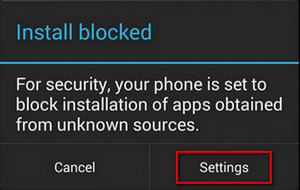
If seeing "Install Blocked" prompt, you should
Install Blocked when installing KingoRoot.apk

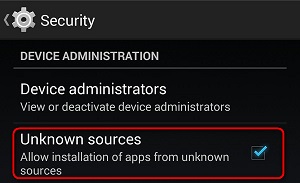
1. Click "Settings" and check "Unknown Sources" in "Security" section;
Check Unknown Sources when installing kingoroot apk

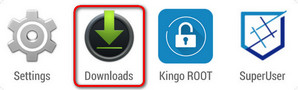
2. Press back and find "Downloads" app;
Find KingoRoot.apk in Downloads

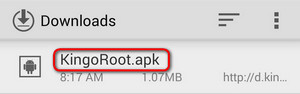
3. Click "KingoRoot.apk" to install it without interuption this time.
Click to install KingoRoot.apk

DOWNLOAD LINK

2. FRAMAROOT ANDROID APK 
If you willing to root android without Computer, there is a familiar app named Framaroot. It is the best one click android root app to root android phone with no PC.
  • (1)  First of all download and install the Framaroot app to your smartphone. Download Framaroot apk 
  • (2) Then go to your phones setting > Security >then Check the box ” Install apps from unknown source”. then click on the downloaded APK file
  • (3) Once you successfully installed the Framaroot android app then open it.
  • (4) Then you need to choose the “install superuser” from the drop down menu.
  • (5) Then you need to choose any of those exploits. ( If once does not work try other two)
  • After that, you need to wait for some seconds to get the message that ” Success, SU binary, and superuser installed ”. After just reboot your phone.
DOWNLOAD LINK


3. ONE CLICK ROOT APK

One Click Root, now. You are going to download the latest and updated APK file of best Android rooting software. To root your Android phones and tablets, you have to must download the new version APK file of Super One Click from here. Download the Super One Click APK and install it on your mobile or tablet Android system and start rooting your devices easily and perfectly. The Super One Click is most popular and best Android root application that rooting mobile phones easily with new updated firmware. Get the APK file of Super One Click from below-provided download link location and install it on your Android system. Your APK file of One Click Root is provided to download at the bottom of this post. Just click to start your download


DOWNLOAD LINK

4. TOWEL ROOT APK ANDROID

Towelroot is a latest Android rooting tool released by Geohot. Android Towelroot download and root Galaxy S5, Nexus 5, Galaxy S4 Active, Verizon S5 and all Android devices released before 3 July 2014! Towelroot apk is an easy and convenient rooting apk for android devices like nexus 5.

You can download towelroot v3 from our server for PC or you can download towelroot apk file to computer and transfer it to mobile to get Android towel root download software to mobile. When you do ,go to settings tab and check “allow install third party apps”. The significant feature is that Towelroot android rooting doesn’t need to reboot the device to complete the rooting.

DOWNLOAD LINK


#5. ROMASTERSU ANDROID APK 


ROMASTERSU is another great app to root android phone without PC. Basically ROMASTERSU is developed by the Chinese developers. Best part it is available in many of the language, But it method the revolution in the rooting android phone without any computer or laptop. I highly recommend ROMASTERSU to Root android phone without PC.
  • Download ROMASTERSU Android App here.
  • Then go to your phone setting > Security >then check the box ” install apps from unknown source”. Disable any antivirus app, if you installed any one. Then click on the downloaded APK file.
  • After that you need to install the vRoot app to your android smartphone.
  • Then you can Root your android phone without using any computer or Laptop PC
  • ->100% safe tool for use.
  • ->Step by step guidance.
  • ->You can use this tool for root, unroot, repair your device and recover your device.
  • ->24 hours online assistance.
  • ->After root services and resources.
DOWNLOAD LINK

How to check whether your android phone has root access?

Still you have any doubts in above mentioned one click root android without computer apps, Use the below app to check weather your phone have root access or not.
  • Download root checker app here.
  • Then go to your phones setting > security >then Check the box ” install apps from unknown source”. then click on the downloaded APK file.
  • Open the app and verify your phone whether rooted are not.
Get  link for download

Read more »